
Download Windows Vista Theme “VistaVG Ultimate” for Windows XP
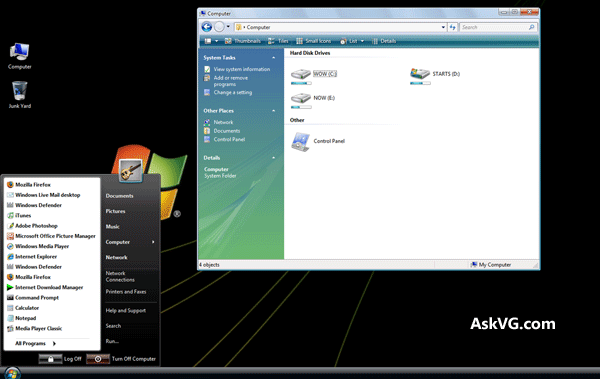
This theme has been made for Windows XP users who want to have “Windows Vista” look in their Windows. This theme can make your Windows XP look like Windows Vista.
“VistaVG” is the first Windows Vista look-a-like theme for Windows XP and all other Windows Vista look-like themes available on net are based on it.
Advertisement
Download Link:
You can download the theme using following link:
Download VistaVG Ultimate Theme
Download Blue Version of VistaVG Theme
Download Dark Black Version of VistaVG Theme
How to Install and Use:
1. Once you download the file, extract it using WinRAR or 7-Zip. You’ll get the main folder.
2. In this folder, you’ll get 4 more folders:
- Bottom Common Tasks (This folder contains “shellstyle.dll” file for showing common tasks at bottom in Windows explorer.)
- Fonts (This folder contains Segoe UI fonts required for the theme. Copy them to “C:\Windows\Fonts” folder.)
- Styler Toolbar (This folder contains Style toolbar for explorer. To know more about Styler and how to use it, visit this link.
- Theme (This folder contains the main theme.)
3. Now download and run theme patcher to allow 3rd party themes using following topic:
Advertisement
How to Install and Use Themes in Windows?
4. Copy all contents in “Theme” folder to “C:\Windows\Resources\Themes\” folder and apply the theme using Desktop Properties.
NOTE: To use “Bottom Common Tasks“, you’ll need to replace existing shellstyle.dll file present in “C:\Windows\Resources\Themes\VistaVG Ultimate\Shell\NormalColor\” with the one present in “Bottom Common Tasks” folder of downloaded ZIP file.
Facing Problems in Applying Theme?
If you face problems while applying the theme or patching Windows, check following tutorials:
- How to Install & Use Custom 3rd Party Themes in Windows
- How to Uninstall / Remove Custom 3rd Party Themes in Windows
- How to Fix Start Menu Cut-Off Problem in Windows XP Themes?
- How to Fix “Windows NT Setup Files Detected” Error Message While Running UXTheme Patcher in Windows XP
- How to Install and Apply Styler Toolbar Skin in Windows XP Explorer?
- How to Get Blue Toolbar Back in Microsoft Office 2003 While Using 3rd Party Themes in Windows XP
PS: If you want to completely transform your Windows XP into Windows Vista including boot screen, login screen, icons, etc, check out following tutorial:
Transform Windows XP into Windows Vista without using Customization Pack
UPDATE: We are pleased to announce that this theme has been featured in various German magazines including PC Welt, Computer Bild and PC Praxis.
superb theme…….you rock..have seen a couple of other sites trying to act as cool…but I found this the best…great work…Regards
muchas graciass por tus valiosos aportess…
sorry if going off subject but maybe someone can help me. I am trying to the Windows NT ThemePack with sounds and icons for windows 7. I have tried looking on google. The reason why I am looking for this ThemePack is that I am trying to recatcher my youth. I started college when Windows NT came out.