
[Tip] Get Windows XP Style Classic “Alt+Tab” Switcher Screen in Windows Vista and Later
“Alt+Tab” is one of the most frequently used keyboard shortcut (hotkey) in Windows OS. Whenever you want to switch to another running program, you just need to press “Alt+Tab” keys together and Windows shows you a list of all running programs with live thumbnails and window titles. You can select your desired program using “Tab” key or using your mouse cursor and it’ll immediately switch to that program.
This “Alt+Tab” switcher screen can be found in almost all Windows versions and Microsoft keeps improving its functionality in each new version of Windows. In Windows XP and earlier Windows versions, Alt+Tab screen was very basic and simple. It just used to show program icons and names in the list. If we talk about newer Windows versions such as Windows Vista or later, we get a new improved Alt+Tab screen which shows running application names along with their live thumbnails so that we can see the window content before switching to them. If we talk about Windows 8 “Alt+Tab” switcher screen, its quite similar to Windows 7. You’ll not find any noticeable UI change in the screen.
The “Alt+Tab” switcher screen also shows “Desktop” in the list so that you can directly access Desktop icons without minimizing all running applications manually.
Advertisement

Its good and very handy but some people who are using Windows Vista or later Windows versions, might find it annoying as it takes some time to show the switcher screen and selecting the running application. If you also find it annoying or boring and want to bring back the good old Windows XP style Classic “Alt+Tab” Switcher screen in Windows Vista and later, this tutorial will help you.
After following this tutorial, you’ll be able to get Windows XP style classic Alt+Tab box in Windows Vista, Windows 7 and later Windows versions as shown in following image:
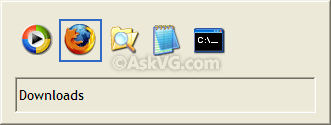
Just follow these simple steps:
1. Type regedit in RUN or Start search box and press Enter. It’ll open Registry Editor.
2. Now go to following key:
Advertisement
HKEY_CURRENT_USER\Software\Microsoft\Windows\CurrentVersion\Explorer
3. In right-side pane, create a new DWORD AltTabSettings and set its value to 1

4. That’s it. Log off or restart Explorer as mentioned here to apply changes.
Now whenever you’ll press “Alt+Tab” keys together, it’ll show Windows XP style classic “Alt+Tab” Switcher screen instead of the new screen.
5. To restore new “Alt+Tab” Switcher screen, simply delete the AltTabSettings DWORD created in step 3. Log off and login again to take effect.
NOTE. If you want a ready-made registry script to do the task automatically, download following ZIP file, extract it and run the extracted REG file:
BONUS TIP: If you don’t want to set the Classic “Alt+Tab” Switcher screen permanent but want to enjoy it temporarily, then you can follow these simple steps:
- Press and hold Left or Right Alt key.
- Now press and release the other Alt key on your keyboard but keep pressing the first Alt key.
- Now press Tab key and you’ll get the Windows XP styled Classic “Alt+Tab” Switcher screen.
Also Check:
[Windows 10 Tip] Registry Tweaks to Customize UI of Alt+Tab, Task View and Snap Assistant Screens
Many thanks for this. I tried it in Windows 8 and it works very well. The default appearance is rubbish and completely unusable.
It does work and without elevation! It’s great!
Thank you!
Thank you thank you thank you!! When I switch from program to program I want it to be fast. My brain spots the icon and I can go to it. The content of each window makes me have to remember the state of the program before I can recognize it. I know the icon is still there but it is still harder to spot with them all spread out with noise in-between them.
I just downloaded the script and it works!
Amazing how good the old stuff was. Thank you sooo much :- )
It works!
But now, Search appears on Alt-Tab task switcher. How could I remove it?
Hi VG,
Works in Windows 8.1, Thanks!
But well, now how to disable the search pain? When I apply the registry hack, reboot, and press alt+tab, a search pain open. I don’t like that search pain. Is there a way to disable it without effecting the search in Start Screen and/or File Explorer?
Again thanks as always!
It just run the script and it works perfectly.. however I realized that the new alt tab menu seems better than the old one =) how can I get it back? uninstall script doesnt work..
^^ The uninstallation script works. You can also manually delete the DWORD created in step 3 to restore default thing. Also try to restart Explorer or Windows.
Thanks a lot man. Just installed a new version of windows 8.1 and the app switcher was displaying in xp mode, i got so worried. Well, thanks to you i’m a whole lot relieved. GOD bless you.
2016-0608: Hey, works in Windows 10 too – bless your soul!!! I just upgraded from Windows 7 last night, and this tip has made my day! The default Windows 10 display showing miniature images of each open window is just a nightmare when trying to work quickly – it’s a lot of extra work trying to sort that out (they tend to all look very similar) or trying to remember to look *only* at the icons, not at the window images – all fatiguing over hours of work – versus just selecting among a clean and compact set of simple and distinctive app icons – like it used to work. Progress is not always improvement 😛 Obviously someone at Microsoft recognizes this, since this options is still in there – I can’t understand why they hid it so deeply ….
Or just go to system settings > View advanced system settings > Visual effects and uncheck the item “Enable desktop composition”. Should work in most cases without messing with your registry. Aero peek setting in same place may also change the effect.