
How to Open .Hlp Files in Windows Vista, 7 or 8 Which Require Windows Help Program (WinHlp32.exe)?
UPDATE: Windows Help Program (WinHlp32.exe) is now also available for Windows 8.
Since Windows 3.1, Microsoft has always included Windows Help Program (WinHlp32.exe) in all newer Windows versions. It is used to view 32-bit help files which have .hlp file extension. But Microsoft decided to not include the help program in Windows Vista and all future Windows versions because WinHlp32.exe has not had a major update for many years, and it does not meet standards for all new Microsoft programs.
UPDATE: Windows 10 operating system comes with HelpPane.exe executable as shown in following screenshot:
Advertisement
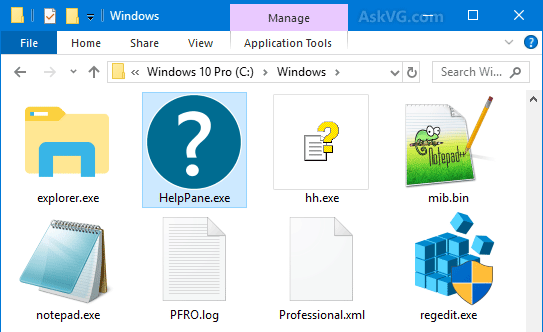
Now whenever you try to open a .hlp file in Windows Vista or Server 2008, you get following error message:
The Help for this program was created in Windows Help format, which was used in previous versions of Windows and it is not supported in Windows Vista.
And if you try to use help in some programs in Windows 7 or Server 2008 R2, you get following error message:
The Help for this program was created in Windows Help format, which depends on a feature that isn’t included in this version of Windows. However, you can download a program that will allow you to view Help created in the Windows Help format.
Windows 8 users will get following error message while trying to access help:
The Help for this program was created in Windows Help format, which depends on a feature that isn’t included in this version of Windows. For more information, go to the Microsoft Help and Support website.
Advertisement
But later Microsoft realized that the removal of help program can cause some problems for Windows users who want to upgrade to Windows Vista or later OS but still rely on 32-bit .hlp files. Actually there are many software that come with .hlp files to provide help and support to users. Therefore, Microsoft started making WinHlp32.exe available as a standalone download from Microsoft Download Center.
So if you also have .hlp files but can’t open or view them in Windows Vista, Windows 7, Windows 8, Server 2008 or Server 2008 R2, then download following update and install it in your Windows. It’ll install the Windows Help program and you’ll be able to view the .hlp files.
Download Windows Help program (WinHlp32.exe) for Windows Vista
Download Windows Help program (WinHlp32.exe) for Windows Server 2008
Download Windows Help program (WinHlp32.exe) for Windows 7
Download Windows Help program (WinHlp32.exe) for Windows Server 2008 R2
An unburied topic? lol
Who is still trying to open so old files?
@Kyle
Downloads for both 32 and 64 bit are available on the download page, after you validate your copy of Windows.
That is actually shocking because Microsoft is usually very good at keeping their things compatible for years to come. For example, they are still allowing Office 2007, Office 2010, and Office 2013 to open and save in the *.rtf and *.doc formats, even though *.docx is a superior and more up-to-date format.
Just one more thing to add to the list why Microsoft has become more and more arrogant since Windows Vista…
.hlp files on older specialised programs are required for some users who wish or need to use these programs. I use 8pro and unfortunately MS in it’s wisdom DO NOT provide winhlp update files for this version, although they do for win8. Its no good those of you who sneer at others who need to use older programme’s because others are not available, or if they are, are prohibitively expensive. When I look at the bloat ware that is included with 8, here I’m talking about the so called Apps, I’ve removed/uninstalled most of them, adding .hlp should not have been an issue.
its possible to open 16-bit programe in windows7, i am having bdase VI 16-bit windows but its not opening in windows7
.hlp files will open with the MS update for windows Vista, 7 & basic 8. They will not however open with 8 Pro, no matter what you download. MS in their wisdom (what wisdom?) have decided that those people who have 8Pro don’t need .hlp.
Does not work and is not available for Win 8 Pro. Cop out by MS.
@Richard Then I’ll consider a third-party program which opens .hlp files without problem in Windows Vista, 7, and 8 (possible?).
We did this download and it didn’t solve our RoboHelp 7/Windows 7/WinHelp 4 generation error message. We’ve ruled out it’s a RoboHelp problem or an issue with the file since we could generate our files on Windows XP systems with this same version of RoboHelp.
{{sigh}}
The below may be worth doing if the help files reside on a server, after the initial install I was getting an error (136) after the install of the fix on a Windows 7 32bit PC, the below fixed the issue, setting the item to 1 :-
To change this setting, users must first add the following new subkey (WinHelp) to the registry:
HKEY_LOCAL_MACHINE\SOFTWARE\Microsoft\WinHelp
Then, users must add a DWORD value that is named AllowIntranetAccess to this subkey. If the value for AllowIntranetAccess is set to 1, the .hlp files that are stored on intranet sites will be available.
I have just downloaded a programme so I can (re)learn some basic programming. I first learned it in the late 1980s. The programme has an inbuilt tutorial, alas in winhelp32 format.
You may think it sad that I want to use basic and also that I just wanted a simple solution to enabling me to use the help function on my 64 bit windows 8. However it seems the only solution available for microsoft is “not applicable” with no explanation. Thank you Microsoft (note of irony)!
I have been using Windows Vista Premium for …as many years. I finally went to an update so I could get IE9. for Vista users, you have to install Vista SP1 then SP2. After that intial headache, I finally got it installed, with IE9 functioning. What happened next is I wanted to use my Wordperfect Office 11 Quattro Pro and it now stopped running with the statement: Runtime error! Program: C:\Program Files\WordPerfectr Office 11\Programs\QPW.exe abnormal program termination.
I can’t seem to get Qpro 11 to function. Wordperfect 11 still works but Quattro Pro doesn’t.
Can someone find an Operating system that will operate all programs without all this cancelling of existing programs?
My friends tell me I should buy a new computer with new software. I was fine with what I had. It’s just those engineer’s on the network that keep changing things on the Web and causing me to have to change my Operating system and loose may favorite programs.
It’s looks like I’ll have to have two computers one for old programs and one just for the internet. Very stupid, but that’s what some of my friends have already begun to do.
What about openning help files in Win XP and below?…
Can I install this on Windows 8.1 x64?
@Okurut, Windows 3.1 through Windows XP can natively open *.hlp files.
It does not work on win 8.1 Works file on 7 pro. What is the deal. I am a stockholder too. Please fix this issue
It works fine on both Windows 8 and 8.1 but there is no Winhelp update for Windows 10. So I don’t know what Microsoft expect us to do when we all eventually have to upgrade to Windows 10. I hope they fix this problem soon.
I have win 8.1, Just Basic works fine, but not help. I have managed to download the help. It will display the topics on the left, but when I click on any topic nothing happens on the right half of the help window where the details should be.
I have re-downloaded the help file (64 bit), but same thing.
After my laptop was upgraded from XP to Win 7 Pro. I was asking for help from one of my windows apps when I found out that all files with the “.hlp” extension can’t be open by “Winhelp.exe”.
I downloaded and installed the latest Winhelp file from this website and it solved the problem.
Thank to AskVG.com for this helpful guide.
Download and install:
download.microsoft.com/download/9/A/8/9A8FCFAA-78A0-49F5-8C8E-4EAE185F515C/Windows6.1-KB917607-x64.msu
It’s fixed
I have PC running windows 7 professional.
I downloaded & installed the fix but still I cannot read old winhelp help files??