
How to Install and Get “Microsoft Office Picture Manager” Back in Office 2013 and 2016
If you are using Microsoft Office 2013 or Office 2016, you might have noticed that the new Office suites don’t come with “Microsoft Office Picture Manager” program. Picture Manager was an excellent and small program included in Office suite which used to help users in viewing, editing and managing pictures quickly and easily. It also used to provide a few advanced image editing features such as crop, auto correct, rotate, flip, red-eye removal, resize, etc.
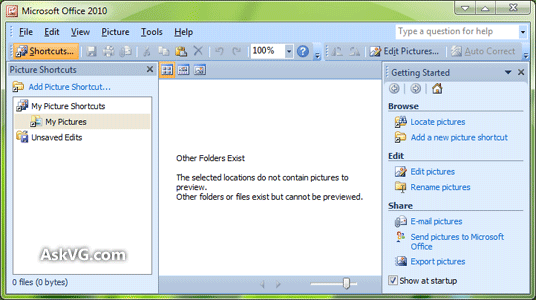
Basically it was a nice piece of program to edit pictures but now its no longer included in Office suite. The reason looks very simple. This program was not updated since Office 2003 version and was looking out-of-date, that’s why Microsoft decided to discontinue its development.
Advertisement
But there are many Office users who are missing this nice little program and want to get it back in newer Office versions.
After receiving many emails from AskVG readers about the same request, today I decided to post this tutorial which will help you in getting “Microsoft Office Picture Manager” program back in Office 2013 and 2016 versions.
Using following simple steps you can install missing Picture Manager tool in your system containing the latest Office versions.
The idea behind adding this program back is very simple. We’ll use a previous Office suite setup and will customize it to install only Picture Manager program:
1. You can use any Office version setup such as Office 2010, 2007 or 2003. You just need to run the Setup.exe file present in Office setup folder or disc, enter product key and when it asks for installation type, click on “Customize” button as shown in following screenshot:

NOTE: If you don’t have a previous Office version setup disc or folder, you can use Microsoft SharePoint Designer (SPD) 2010 version to install Picture Manager. You can download it for free using following link:
Advertisement
Download Microsoft Office SharePoint Designer (Frontpage) 2010 Free
Its absolutely free and doesn’t require any product key to activate.
2. Once you run the setup, on next screen, click on each given program link and select “Not Available” from the options list:

3. Then click on “Microsoft Office Picture Manager” program link present in “Office Tools” section and select “Run from My Computer” option.

So you’ll get a screen similar to following where all program entries except Picture Manager will have a red cross icon on them:

4. That’s it. Click on “Install Now” button and let the setup install the program. It’ll take a few minutes and once the setup finishes, you’ll be able to enjoy Picture Manager program in Office 2013 and 2016 versions.
Do you also love this handy program in Office suite or you use any other image editing program? Feel free to share your comment…
Also Check:
Thank you, lost without picture manager
Thank you so much. I just bought a new laptop and was lost without it! I was able to follow your instructions, and even for a sometimes tech-deficient person like myself, was able to download it perfectly.
Awesome! The “new” version of this program is just annoying to use, and is more limited in what it can do with picture editing. New is NOT better. BETTER is better. Too many product updates miss this simple, but profound, mantra.
Now, if someone could just figure out how to get rid of those (utterly) annoying mouse-hooks at the screen corners that Microsoft decided we “need”, I could die much less unhappy (with Microsoft).
Very nice , remains the question how to stop Windows10 from updating Office 2010 ??
We have only Picture Manager installed and dont need the other data auto installed !
If you disable the option ” install other products ” you also dont get other important things which you need , so this is not an option for disabling auto-updates for Office 2010………..
Any idea ??
Thank you so much for this! It worked for me.
Hint: I used Microsoft SharePoint Designer (SPD) 2007 version, removed and reinstalled a few times to make it run.
Is there any way to make the MS Office Picture Manager run standalone?
That is, I don’t want to begin the install for the Sharepoint Designer. Sometimes when you have versions of MS software installed it can cause problems for other versions of MS software. I’ve run into installation problems before and the only solution was to remove the picture manager.
Would be nice if someone could figure out how to distribute this program stand-alone or make a free open-source program that was just as simple to use.
I have Office 365 already installed , then later installed this 2010 Picture Manager next to it.
Both Office-programs working fine , no problems so far. Only updating Office 2016 , take care; do not update your Picture Manager ! The program will not work any better…………
Thank you SO much!!! I never knew I would miss this so much, really appreciate this help!
why the F does MS remove a great program over and over again?
Just upgraded my Windows 10 and yet again have to reset the photo editor
thank you very much the article was very helpful.
I bought a new Windows 10 computer. Part of the install before I picked it up was to have MS Office 2013 installed. I did NOT receive a disc or even the product key from the install and now I found out the place where I bought the computer has gone belly up!
What do I do now in order to install the Picture Manager on my Windows 10, MS Office 2013 without the Product Key or a disc. I feel like I’m SOL.
Any help? Thanks!
^^ Did you format the computer? Did you receive any recovery disc with it?
I just upgraded to Office 2016 and really missed having Office Picture Manager to edit photos. While looking for a solution I came across you site – eureka! Your instructions were right on and I am, once again, happily editing pictures using OPM. Thanks a million!
Thank you so much for this easy fix. Can’t fathom why MS don’t provide this anymore. It is exactly what I need for picture editing, compression etc. Thank you so much for this advice, not sure how I’d manage without this programme. Thank you!
Thanks a million!
Thank you so much, it worked like a charm! So happy and relieved to have Microsoft Office Picture Manager back! 🙂
Thank you so much worked brilliantly and very quick to sort out with these instructions. They really need to stop adding unneeded filler stuff to apps. Keep it simple!! So happy.
Thanks for the info
There is no Microsoft Office Picture Manager link!
thx I needed to know this
tq very much. its really help!!!
Thank you so much for this! I’ll never understand why ms doesn’t ask us what we want!
MasyaAllah!, thank you very much! Allah bless u ^^
After downloading SharePoint 2010 when I wanted to start with the detailed instructions to activate Picture Manager – oh happiness, it was already done without me having to do anything!!! Thank you so much for this advice. I just love Picture Manager. Working with the 2016 Microsoft Photos Editor is so cumbersome!!!
Dear VG-You are brilliant! Thank you. I was about to purchase Office 2010 after purchasing and installing office 2016 mostly because I had no picture manager except Adobe photoshop which is overkill. This is an elegant fix. Many thanks!
I reformat my PC every now and then and I always go back to this site to install this program. Thank you for sharing this!
I deleted before installation it by mistake, now I couldn’t install it again. So what do I do now?
I downloaded. does not work. i can’t find microsoft office picture manager. nowhere. I am so sorry because I installed windows again
This is an amazing piece of software that I was devastated to lose when it was dropped from Office. I have used it on my new computers every time I upgrade. Microsoft SharePoint Designer is real easy to use for those that do not have Microsoft Office. It is available in both 32-bit and 64-bit formats. I can’t thank you enough!
Thanks very much. I was really struggling not having it. It is very good, I cant believe Microsoft dropped it.