
Download Official Royale Blue, Royale Noir, Zune and Embedded Themes for Windows XP
Today we are going to share 4 official Windows XP themes released by Microsoft.
The most important and impressive thing about these themes is, the themes don’t require any kind of patching. So you can easily install and apply themes without worrying about patching uxtheme.dll file in your system.
So here are the themes:
Advertisement
Table of Contents
1. “Embedded” Theme
“Embedded” theme was taken from “Windows Embedded Standard CTP Refresh” edition. Its a modified version of “Royale” theme.

You can download it using following link:
Run the installer and apply the theme using Desktop Properties.
2. “Zune” Theme
“Zune” theme was released by Microsoft to provide its new portable player “Zune” like feeling in Windows XP. Its also based on “Royale” theme.

Advertisement
You can download it using following link:
Run the installer and apply the theme using Desktop Properties.
3. “Royale Noir” Theme
“Royale Noir” theme is a darkened version of “Royale” theme. It was developed as a black version of “Royale” theme but was never released by Microsoft as it was not perfect and contained a few issues like color mismatch.
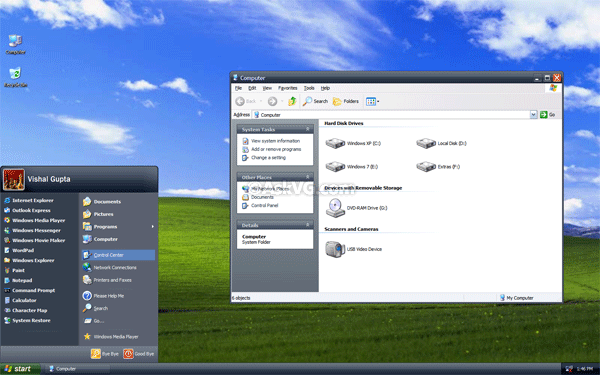
You can download it using following link:
4. “Royale” or “Energy Blue” or “Media Center” Theme
Royale theme was created for Windows Media Center Edition 2005 and Windows XP Tablet PC Edition. This theme is a combination of blue and green colors.

You can download it using following link:
As usual run the installer and apply the theme using Desktop Properties.
Lets mention again, all above themes are official Windows XP themes and can be applied without patching anything in your system. So go ahead and check them out. 😉
Also Check:
All I keep getting is that blue Zune or the orange start button. Not noir and even when I want the all in one package I cant get that so What!!?? And why is noir looking dark green on the screen shots when its sup[posed to be black?
It’s looks awesome, royale theme really is one of the best themes have been made for windows xp, Thanks VG
THANKS NOW I CANNOT USE ANY THEMES
I CANNOT USE WINXP THEME ANYMORE
AND IM STUCK WITH THE SH!TTY CLASSIC WINDOWS THEME
I HATE THIS
well then you messed up cuz they work just fine lol
These themes are amazing they totoally changed my view about xp
Seriously, it’s about time that those people still using Windows XP should start upgrading to Windows 7 or Windows 8. The more you use that antiquated Windows XP, the more you’re risking your computer to those nasty viruses and malware. Microsoft will retire support for Windows XP on 2014 and that means no more updates and security patches for those Windows XP users. Seriously!
Windows XP will always be the best OS ever.Fourteen years in development(including beta). Take ownership of files in 7 what is that crap all about.Software developed to perfection for XP. Been into IT For 23 years and microsoft peaked with windows XP. Anything else is overdeveloped
@Stephen Brough
You can’t call Windows XP the best OS ever if it’s the version of Windows that has the most number of malware written for it. Windows XP is a security nightmare. The reason why Windows 7 or even Windows 8 requires Taking ownership of files is because of security reasons. Hell, malware creators are still attracted in making viruses for Windows XP because it was popular and its security features is nothing compared to Windows 7 and Windows 8.
Again, you can’t call Windows XP the best OS ever because of the fact that it’s the most targeted operating system by viruses and malware creators out there. I’m glad Microsoft will finally kill Windows XP after damn 13 years after its release date. Any person using a decade-old OS in this modern time must be out of his/her mind. Good luck keeping that old, rusty, antiquated and unsecure Windows XP for these coming years.
I personally like windows xp because many programs work on there, doesn’t need much ram, hd space, and cpu juice, which means that you can run more intense programs then on newer ones, and you can easily run multiple virtual machines on there.
XP very best program in the world
I am very appasionate and fan’s windows system corporation
XP by by by
i personally like windows xp better then windows 8 its a piece 0f shyt windows xp can do just as much as windows 7 and 8 and its easier to mess with configure anything ive had my windows xp for about 4 years still running strong with 10,000 songs and videos on it keep in mind its a desktop and i dj with it no blue screen nothing fast as hell i have never has an anti virus or firewall except windows firewall and never use internet explorer and never gave me any problems at all
LOL @ the IGNORANT CLUELESS about XPs security flaws/malware – haven’t you heard about virtual IE for web facing or just have the entire OS Virtual eg Sandboxie etc. With modern SSD you can image an OS in minutes + simply replace an Integrity bust XP with such a back up in minutes – TALK about small minded people who cant think outside the box. EOL OS security concerns belong in the LAST DECADE just like the XP critics above :D. Plenty of people mange to keep running EOL Windows (eg win2k) EVEN w/o todays tech perhaps the gullible goons on here should talk to them…
@Al
Guess you better need to use AutoCorrect first before spewing such tin-foil hat analogy here, okay? Your non-sense is full of typographical and grammatical errors. Duh!
^^ Never. Its just same as you use default Windows theme.
How to change folder backgkroung from white to blue in Zune theme , any idea ?
^^ No. These themes can be used in Windows XP only. For Windows 8/8.1, check out following:
https://www.askvg.com/download-windows-xp-luna-royale-blue-and-zune-themes-for-windows-8-and-8-1/
What happen if I did this??
1. I installed one of the themes.
2. I applied it to my Windows 8.1 Laptop.
Will my laptop crash or what?? I’m scared to test.
^^ If you install these themes in Windows XP, nothing wrong will happen. But dont install these themes in Windows 8.1 or other OS. Their theme structure are different so you’ll get a buggy classic look.
So VG, Will my laptop will be unusable and need System Restore or just the theme? Will it be Aero Lite? I will never use WB anymore (it made our laptop unusable). I downloaded but not installed the Zune theme. it’s for VirtualBox. I don’t have an Win 8 VBox because ISOs are big.
P.S: If you don’t get this: “I will never use WB anymore (it made our laptop unusable)” I used System Restore.
^^ These themes cant be used in Windows 8/8.1. These themes were designed only for Windows XP.
My question is, Will it CRASH or the theme will be AERO LITE??
^^ I have not tried to use these themes in Windows 8/8.1 so cant provide exact answer. But most probably you’ll get classic or Aero basic interface.
Btw if you want Aero Lite theme, you can activate it using following tutorial:
https://www.askvg.com/how-to-enable-hidden-aero-lite-theme-in-windows-8-rtm/
^^ Okay thank you! Anyways, i have the Aero Lite thing.
updates and security patches are for ~. my xp machine is running faster than the computers coming out today because it isn’t about the operating system or the hardware, it’s about how you configure it and know how to use it.
i’m running xp x64 with pale moon. i just finished playing starsiege tribes, a new high resolution build of an old game, and it plays like a dream.
my video card overheats when i try to play fallout 3, but there are a dozen others i can play in the meanwhile, like thief, deus ex, and starcraft.
7 would be wasted on my 4400/7800gtx system. when i have a quad core system, then it’ll be the foundation cornerstone, but it will have nothing to do with security or updates.
i sure hate it for the rest of you.
I can’t download anything because Web browser redirects me to the same page.
Thank you for the Microsoft Zune theme. It feels pretty and beautiful, i only hoped the “Royale” or “Energy Blue” or “Media Center” Theme just worked that much well as the Zune.
The default XP theme feels kind a dated now-a-days: and i needed a feel going like Win7.
I had to revert to Winxp because 7 simply doesn’t seem to work well with my rig. Hardware does die that easily, so i am glad i got this theme. Feels brand new.
As for Win7 themes they’ll h’ to wait. lol
Thank you for the theme, please keep posting newer themes for XP.
I love to collect and use themes. With XP even in 2018.