
[Start Screen] How to Pin, Resize, Move, Close or Uninstall Metro App Tiles in Windows 8 and Later?
Microsoft’s latest OS Windows 8 comes with a new Start Screen which shows live tiles of installed programs, system tools, etc to provide quick and easy access to your favorite programs.
If you have started using Windows 8 RTM or planning to install it, here are some interesting tips and tricks for you to enjoy this new Start Screen in Windows 8.
Table of Contents
1. How to Unpin (Remove), Uninstall or Resize a Tile in Start Screen
If you don’t like a tile in Start Screen and want to remove it from the screen, just right-click on it and click on “Unpin from Start” option in the bottom bar:
Advertisement

You can also completely uninstall a tile by clicking on “Uninstall” button. If you want to restore a built-in app later, you can follow simple steps given here.
You can also resize a rectangular tile by clicking on “Smaller” button. You can again make that tile large by clicking on “Larger” button.
You can also turn off live previews of tiles using “Turn live tile off” option.
Also Check:
How to Disable Live Tiles Feature for All Apps in Windows 8 and Later?
2. How to Pin (Add) New Tiles in Start Screen
If you accidentally removed a tile and want to pin it back to Start Screen or if you want to add a new tile to Start Screen, move your mouse cursor to the extreme top-right corner. It’ll show the new Charms bar, select “Search” option from it.
Advertisement
Alternatively, you can press “Ctrl+Tab” keys together to access Apps screen or right-click on Start Screen and click on “All apps” option in bottom bar.
It’ll open the Apps page where you’ll get a long list of lots of interesting apps. Right-click on an app which you want to pin to Start Screen and click on “Pin to Start” option in bottom bar:
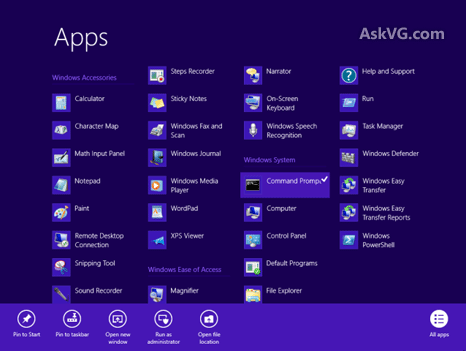
That’s it. It’ll immediately add the app tile to Start Screen.
3. How to Move Tiles in Start Screen
Did you know you can also move the tiles in Start Screen using simple drag-n-drop? Take an example of the above mentioned “Command Prompt” tile which we added manually. We just dragged-n-dropped it at the beginning of Start Screen:

Isn’t it simple?
4. How to Close Apps in Start Screen
You can close a running app by pressing Alt+F4 keys together. Or you can move mouse cursor to top-middle area of screen and the cursor will change into a hand shape. Now click and hold the cursor and drag-n-drop it to the bottom and it’ll immediately close the app.
Also Check:
- [Tip] Organize Windows 8 Start Screen Tiles in Groups and Name These Groups
- How to Change Icons and Text Labels of Start Screen Tiles in Windows 8 and 8.1?
- [Tip] Customize Start Screen Tiles Background Color, Text Color and Logo in Windows 8.1
- Run Metro Apps on Windows 8 Desktop, Add Minimize, Maximize and Close Buttons
PS: If you don’t like the new Start Screen, you can skip or bypass it at startup using following tutorial:
How to Skip Metro Start Screen and Boot Directly into Desktop in Windows 8?
You can also check out following exclusive video showing how to use Windows 8 Start Screen like a pro:
Do you like the new Start Screen? Please let us know your opinion about Start Screen in your comment. Also feel free to share tips-n-tricks for Start Screen if you have found any…
Figured it out! 2-finger click with the touch pad! Hope that helps anybody else.
I get the IDEA of the new tile system, but Microsoft always seems to forget that not everyone needs or wants everything hidden and phone like. There are applications (not apps, which MS seems to insist now covers everything) which I use once and a while, and I could just go to the all programs and find them. Now, I’m not even sure how to close some of this stuff, much less find it. I have installed MS Office 2003, and have yet to even FIND it. Yes, I could spend time to learn yet another way of doing things, but better would be to make things actually intuitive, not what MS THINKS looks cool or modern or Mac like or phone like. Computers should be easy to use, not the other way around. I go on my computer to USE it, not LEARN how to use it. See the “SONY box thing” on YouTube, and just substitute Windows, and you will get the idea of what I mean. “Pumping out impossible to use, useless piece of s***. Ay Carumba.
Though it is a good idea to simplify our work with Tiles,but I have found extremly poor perfomance of Windows 8,due to the following reasons:-
1.My necessary Tiles like Mail etc.. have been removed and blocked,due to repeated entries of my 100% correct Password and I am unable to install them again with the entry of my correct Password,though I am operating my Yahoo Mail Account with the same Password.What to say about Windows 8 performance,when it is unable to recognise a correct Password,creating problems wih my other Accounts also.
2.A lot of simple operations like ‘Copy’ and ‘Paste’ in yor previous versions have been made complicated (Two Playlists are the examples),creating a lot difficulties to your costumers.
3.I am not a new comer, and have been operating all of your ‘Windows’ Since ‘Windows 95’ and never experienced difficulties in operation of in any of your Windows advancements,but since then I have purchased ‘Windows 8’,I am wasting a lot of my time in understanding and even in various operations after understandig,due to which I find it as a ‘Complete failure’.
4.If you are unable to help us in this regard,better to rename your ‘Windows 8’,which it deserves.Otherwise it needs immediate issue of a ‘Service Pack’ to remove its faults.
ok so i can make my tiles smaller but none of the tiles will become bigger. i know how to do it but there is no option for me to make any tiles bigger… so any tips? ideas? please help! :/
^^ Some sizes are available only for selected tiles. You cant have all 4 size options for all tiles.
I click on my email tile and it brings up folder options. In the bottom left corner I have 2 different email accounts that I can click on. I would like to get rid of one. Can anyone explain to me how to do this?
I really HATE the new start screen and the tiles! Why can’t I have the option of using this or the traditional desktop layout!?
Whether or not Microsoft has the BALLS to issue a USER customizable OS instead of FORCEFEEDING this “tile” crap to us has yet to be seen. I just recently got a new laptop and im SERIOUSLY considering wiping the whole damn thing and reverting back to XP in spite of a lack of any further support for it BECAUSE this OS (8.1) is SO hard to navigate, customize to MY preferences, being told i “can’t” do something, not being able to find what i need, being to FORCED to sign up for something that I DONT WANT, and on and on and on….. I HATE the tiles, and that should be reserved for phones or tablets and NOT PC’s! To hell with this crap, I’m going to LINUX!
Agree with all the haters. Maybe there is a way to figure this out, but I would like a tiny calculator so that I can do little calculations while still being able to work in and see other programs, but all I get is a full-screen calculator with no x button to get rid of it. I thought the idea behind Windows was so you could have, well, windows. Right now I’ve got a window the size of the rose window in Notre Dame, but at least that one looks nice.
HATED IT!! Thumbs down This 8.1 crap is crap. If I wanted my screen to look like this I would’ve bought an ipad! Great probably for touch screen navigation; but why take away our options to adjust. The sart screen is bloatware and ridiculous to navigate the entire sysem is ridiculous to navigate. I burnt out my hdd in win7 laptop, bought new hard drive and 8.1 since no Friggin win7 os anywhere…smdh! I think this is a bunch of crap! Had to end up purchasing new laptops for me and hubby since his hdd burnout too. I have an old copy of xp I am thinking abou wiping everything out as well, but afraid I will fry my os system again. I am so frustrated with all this, and bad part is the win81 is missing so much compatibility and drivers, wifi is lost on my old pc.office wants to forcefeed account setu and “track’ware. What is the world coming to.
I’m so over this crappy new os! How the BLEEP can I make my desktop my main opening screen and minimize this stupid start menu like it was in Windows 7. I don’t want to see all that crap when I logon, I just want to get to my target files automatically not jump through hoops to access my own damn property and files.
^^on the Desktop, right-click the Taskbar and select Properties>Navigation>Go to desktop instead of start when i sign in.
or get classic shell. problem solved.
https://www.askvg.com/how-to-bypass-start-screen-and-direct-boot-into-desktop-in-windows-8-1/
I must say im so disappointed in microsoft, this is their worst ever i really hate windows 8, its just not user convenient total bulls**t!!!! including their windows phone!!!!!!
have a new laptop with windows 8. doesn’t seem to be working correctly. try to move, resize tiles; wont let me, can not copy and paste pictures, fresh paint doesn’t open, please help me, try to save on wordpad wont let me aswell.
^^ You should try to reset the laptop to factory settings using Reset or Refresh PC options:
https://www.askvg.com/tip-reinstall-or-repair-windows-8-computer-using-reset-pc-and-refresh-pc-options/
Accidentally unpinned the shut down tab on my desktop, how do I get it back
^^ What do you mean by shutdown tab? Please provide more details.
what happened to the re-sizing? now you can only go larger and smaller. i remember when you had three options. large, small and extra small
this system is exceptionally unintuitive and not well thought out. clicking an X closed an application, not my 90 year old arthritic mother is supposed to drag down the tile pause, wait for it to flip. she actually can’t do this. SO alt + f4 right, well, this is small keyboard style with no F keys! Microsoft, you really blew it on this one!
Windows 8/8.1 is a bit on the style of a computer game where u spend hours trying to to find something that’s hidden from view.
Tries to look clean n pretty, but then so does an induction cooking Hob .. albeit a nightmare to do any serious cooking on.
Windows 8. Was deleting history but laptop stopped workin so I pressed x. Said I needed restart laptop so I did now start screen had no tiles and pressed on all apps to put dem back but only got blue screen. Google is gone along wit everything else. Tried restoring bit won’t
my newly created tiles that worked no longer will open a website? Screen says page can not be displayed? All of the rest of the tiles work fine.
I, too, am not pleased with 8.1. It often doesn’t work the way the tutorials say. And when it does, it’s still more cumbersome than previous Windows. I especially am insulted by the screen-filling calculator, much preferring the user-friendly one we’ve had for years. I have to go to Task Manager to turn it off, even when I don’t really want it OFF, but just to be able to move it around so I can see other windows on the screen. Playful, juvenile extras have been put front and center, and useful software is hidden. The so-called Charms bar that floats in and out obscuring the work I am doing is also annoying. I have other specific gripes, but this is enough to give the picture. So, Microsoft, WHAT ARE YOU GOING TO DO ABOUT THIS MESS? AND THE FIX HAD BETTER BE FREE!!!
When my notebook automatically turns itself on, as it does with no help from me, when I flip it open, there’s a very nice picture of rocks, ocean, islands etc. Is this a Windows [8] screen, or Google, or what? But more to the point: I’m not bothered by tiles, as many users seem to be–but there is a small rectangular picture center screen; beneath it I must enter a password to begin doing anything.
How to dump [ie, delete] this annoying nuisance, and just get going? It is NOT necessary;I’m the sole user and in fact the sole occupant of the apartment.
SOS!
I dislike the windows 8 start screen INTENSELY. If I wanted an Apple experience I would have purchased an Apple product. Now I might as well buy and switch to Apple.
I love my new red HP Special Edition computer compete with 8.1. I think the new start screen is great and would not go back to any of the old Windows now. I am 76 years old and have been able to figure out how to use it. Love it, love it.
Your first instruction for unpinning a tile doesn’t make sense. How do I “right click” with a Surface Pro 3. If I can’t get a drop down menu you give me no options to delete the tile.
^^ On touch devices, tap and hold on a tile to get the options.
And finally even MS recognise its a bad design, c.zy UI made for phones and tablets.
Now they offer free upgrade to their new spying OS (they call it make my internet time more personal)
The final(?) answer, THE ULTIMATE WINDOWS 10.
I have the same problem as Mist – right-clicking does not bring up the bottom pop-up menu. This occurs whenever I use my keyboard; however, I am able to move icons when I use the touch screen. It wasn’t like this before. How can I make the changes so I can customize start screen with my mouse?