
Ok. So we got our hands on Windows 7 latest build and to be honest, it's very fast and reliable even its under testing at the moment.
Although at first look it looks similar to Windows Vista and why should it not look as its using the same Kernel. But there are lots of enhancements and feature additions which makes it better than Vista as well as faster than Vista, no doubt. You can keep my words.
So without wasting any time, let us look at some new features and options which make Windows 7 unique and better than earlier Windows versions:
1. Setup:
Windows 7 setup is very same as Vista setup. Same interface, same options, same wizard, same timings. Everything is same except the setup background and the boot screen which is too awesome. "Starting Windows" is displayed along with a glassy scrollbar in the middle of boot screen. The setup background is the same image which is used as Desktop wallpaper in the latest Windows 7 build.

It took almost 25-30 minutes in installing Windows 7. Nothing was asked during the setup. A few things like time zone, etc were asked at last. So you can make a coffee or drink after running the setup.
2. Windows Explorer:
Windows Explorer has also been modified a bit. New commandbar (without icons as usual), new left-side pane containing Libraries, Favorites, etc, new Details Pane, a few new options in "View" menu like Content and at last re-sizable Searchbar.
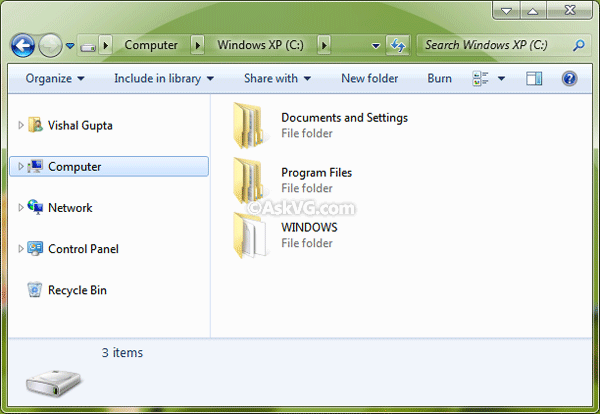
Overall new Explorer looks better and more simple. Also they have moved the "Group By" arrow to the left from right.
3. Desktop Context Menu:
Desktop context menu is similar to Vista but you get 3 new options:
- Share with
- Display Settings
- Gadgets

Share with is used for new Home Groups, Display Settings directly launches the Graphics card Properties tab and Gadgets launches the Sidebar Gadget list.
4. New Control Panel:
Control Panel window has also been modified. The left sidebar takes very less space and resizes itself whenever any control panel item is opened in the window. It provides more space.
![]()
You can also switch to Small Icons view by right-clicking in empty area and selecting the option:
![]()
As you can see now you can save the view settings which was not possible in Vista and people complained a lot about it.
5. System Tray:
Now icons in System tray are highlighted when you move the cursor over them. Also you can see a little difference in icons when you click on them. The little arrow at start shows the hidden/inactive icons.

The empty space at last of the taskbar is new "Show Desktop" shortcut. It minimizes all opened window and shows the Desktop. Very handy and cool feature:

6. New Taskbar Options:
Now Taskbar and Start Menu Properties contains a few new options and has a re-designed interface.

As you can see now you can change the taskbar location directly from the drop-down box.
PS: Classic Start Menu has been removed. I hope it'll be added in later builds.
7. Ribbons in MSPaint and Wordpad:
As you all know about Ribbon interface implementation in Paint and Wordpad applications:
MSPaint:

Wordpad:

8. New Windows Defender Interface:
Windows Defender got a new interface in Windows 7.

They have removed the "Windows Defender logo" from right and also changed the colors of window.
9. Improved Firewall:
Windows Firewall has been improved a lot in Windows 7. Now its more customizable and provides more security:

10. Re-designed Calculator:
Calculator has also been re-designed. It provides 2 new options: Programmer and Statistics.

11. New Options in "Folder Options":
There are 2 new options in "Folder Options":
- Hide empty drives in the Computer folder
- Try to search the content of unknown file types

12. New Options in "System Properties":
"System Properties" also provides 2 new options:
- Save taskbar thumbnail previews
- Show shadows under windows

If you disable "Show shadows under windows" option, then all window loose the shadow around them and it looks very ugly at the moment but its a nice addition.

As you can see the black corners around window which doesn't look good but since its a testing build. Such GUI glitches would be fixed in later builds.
13. New Boot Screen, Login Screen and a little modified Aero Theme:
As mentioned at start, Windows 7 contains a new Boot screen showing "Starting Windows" along with a glassy progressbar in the middle.

Login screen is similar to Vista except the background. Vista login screen background is same as its default Aurora wallpaper. Same case with Windows 7, its login screen background is same as its default wallpaper which is also used during the setup.
And Aero theme is very same as Vista theme. Only a little tweaked start menu and taskbar. Also the maximized windows don't loose transparency.
So that's the end of this review. There is much more to share which is coming in near future. So stay tuned with us...


Marc said:
Thanks VG. Thats a super review. Windows Seven looks promising to me.
wtf said:
omg, its vista !
, i wonna new windows, not vista again
Navjot Singh said:
That's an awesome review. BTW would you like to share, how did you got hold of Windows 7? MSVP?
wtf said:
i mean for visual style, if its faster then yay, but...they could change style
, ohh i discovered this site and i love it !!
lifehacker said:
y d expand arrow (in 5. System Tray) is upward not left, any new way.....
Manan said:
Super! I'm so jealous right now.
@lifehacker, that is because when you click on it, the icons will be shown in a box that will appear above the arrow like how the taskbar thumbnails are shown in Vista.
@wtf: it's Vista done right.
@Navjot: yes.
Swapnil said:
Oh, thanx and plz can u upload W7 wallpapers
Rahul Manekari said:
Windows Se7en will rock..
AMIRZ said:
Ramesh Kumar said:
Thanks for reviewing Windows 7 !
Sora said:
thanks for the review Vishal really appreciate it
Alive said:
I Like the new bootscreen and its interfaces. I Will upgrade to windows 7
Sachin Tendulkar said:
Mr Vishal what is the latest build????? From where u got?
mavihs said:
gr8 review!!!!
any idea if i can get my hand on it 2????
& wat r d requirments for it & will it work in virtual machine?????
Salvatore Guiliano said:
thanx vishal, what are the system requirements for se7en..?
Jeet Chowdhury said:
CooL
M4573R said:
Damn, it looks same as Vista
. I hope it work better
Piyush said:
It's a
Is there any site providing it's download
Pleaseeeeeeeeeeeeeeeeeeeeeeee............................infinite
Manan said:
@Sachin the latest build is - M3 or pre-Beta. As far as config requirements are concerned, it requires lesser requirements than Vista.
The demo given by Microsoft was on a 1GHz Atom processor with 1GB RAM, so the desktop version will also work on a similar config.
Hari Maurya said:
Gr8...Nice Review....Vishal...thnx
msptalks said:
so how much memory does this windows 7 need?
4gb ram + min 512mb dedicated graphics ??? !!!
Guachomelaco said:
Excellent your tutorial with screenshots. The better explanation for any news feature and enhancement of windows seven. Concise, clear and practical.
Excelente explicación sobre algunas nuevas caractirísticas de windows seven basado en imágenes. Conciso, claro y práctico.
AmalRoy said:
nice and short review good work by vg.
anjelo said:
AWESOME!!!
I like that bootscreen!!
hmm can you make one for XP ??
Jeet Chowdhury said:
Phirse... No Support For Extension Editing In Folder option. What Aboit GIF In Photo Gallery?
VG said:
^^ Same as Vista.
Fastguy397 said:
looks nice.
but u might need a faster processor (dual core would be perfect)
Arjun said:
I love the bootsceen of windows 7.
Could anyone give the windows7 bootscreen for XP
Jovy said:
Boot Screen is awesome! Where can I download the bootscreen for xp
David said:
Awesome review.
Peter H said:
To MSPTALKS:
I'm currently running my Windows 7 installation with 512 MB ram. It works great.
Like someone else said earlier, this is Vista done right.
ssombret007 said:
Vishal, what is the main reason they are making a new version so soon, won't it be hard for the average consumer to want to change so soon, people are still using XP, and Vista just finally settled in? I think it is great they are improving, hope it won't be a huge expense to upgrade. Is there going to be any new architechture like, the new file system they dropped from vista for better archiving files? Great review, seems like it will be more friendly and not so cluttered. This sounds like the result of alot of user feedback from Vista. Thanks for the preview:)
VG said:
^^ You are right. Actually Windows 7 is based on Vista so people will not find it hard to use it. It'll have lots of improvements and a few additional features. Vista didnt do well, so its a wise idea to release a new Windows now.
kwakwa said:
where can I download this setup??
Navjot Singh said:
@kwakwa - Its available only to MSVP members as of now. Though if you want to try, search any torrent sites and you will find it easily though that's illegal.
Faltoo said:
dude
its cool

plese
where do you get it from
plese tell me
Faltoo said:
PLEASE TELL ME WHERE I CAN DOWNLOAD WINDOWS SE7EN

WHERE YOU HAVE DOWNLOAD IT FROM
Sid said:
Great review VG... I better wait for final version ..
Osmosiz said:
Nice review for windows seven, make a lot of info that i would like to know. Thx, VG
Robero aka Garry said:
Thanks for sharing with us Vishal. Great review as always. I do agree that Windows 7 is much
like Vista which should make it easier to use and Microsoft's timing was right on the money in
regards to the release of Windows 7, because Vista did not go over very well. Extremely
wise decision in my hubble oppinion. That's my 2 cents worth on this and I am sure most
would agree ? Then again maybe not ? To each their own I always say.
Sid-Crafty said:
please release a same theme for windows xp also as you have done for vista.
Faltoo said:
I have just install windows 7 but its not applying aero.
please help!! for getting aero in it!!
Faltoo said:
Sorry aero has come now
Faltoo said:
sorry for disturbance
Jeet Chowdhury said:
Yaar Plz Provide Me A Download Link. Wanna Test Drive.
AS said:
Hai VG, do you have any win 7 customization pack with you ?
VG said:
^^ it would be too early to create Windows 7 customization pack as its UI going to be changed in later builds.
Me said:
More crap i'll have to figure out how to turn off.
rn3sto said:
Hey dude!!
nice one...
except that you forgot the new look of the taskbar!!!
I mean now, we will see just the icon of the program instead of the whole name of the app.
It would be like a mac, not totally, but seems.
Also the new messenger just for Windows Se7en
Ryan said:
Hmm, not sure whether I want to get it or not as I'm not sure whether aero work on the Intel 915g express chipset or not...
ganesh kumar swami said:
PLEASE TELL ME WHERE I CAN DOWNLOAD WINDOWS SE7EN
WHERE YOU HAVE DOWNLOAD IT FROM
Kev said:
you forgot to mention about that aero is actually different. The inactive windows are more flat and it has a certain higher tone of brightness to it. Its a nice little subtle difference =D
Spider said:
Jal said:
hey VG, when is the next milestone will release. Is current milestone release a stable one. considering it be a pre-beta, please give us an article about BUGS in this milestone release of Win 7 which should be rectified in the coming releases. Wat are the cons of this release????
Nikolaj said:
ok i will upgrade to win7 the ferst day it is in stores
artur said:
Great Review.
I'm happy because this windows 7 suck like vista .
Security = almost 0 (Virus are ready for this system) .
Low Performance (layer after layer to execute a program).
More money for the same OS (only 2-3 stupid options are changed from vista , commonnnn !!!!).
If you are a professional install FEDORA .
Silverblue said:
Thank you guys for deleting my comment.
I've posted a link to the piratebay (windows 7) but I suppose you admins are intimidated of certains URL's. That's pathetic.
Anyway: if you want to find windows 7
Google: "Windows 7 Build 6956 32 bit iso WINHEC
VG said:
^^ Your comment was deleted because it contained a link to warez. Windows 7 has not been released to public yet, so any link to download it is illegal.
Silverblue said:
NO IS NOT TRUE, It's a false statement!
A link (URL) can never ever be illegal! Ever!
Yes Windows 7 has not been released to the public but it doesn't mean it have to be warez, it can be a pre-release or an alpha or beta release.
Anyhow the link can never be illegal, with your logic everything indexed by Google is illegal.
manu said:
"it's Vista done right."
so true
Sekko said:
I have Windows 7 Build 6801 with activation ready, but I haven`t install it, because my question is, if I install Windows 7 is there any drivers available for my PC, and all the software are compatible with that version right now...?
VG said:
^^ Yep. Almost all Vista drivers and software works fine in 7.
Sekko said:
I install Windows 7, I cant install my PC drivers... nor my printer or my cam, the only driver that installs is the ones from my USB Flash..., it always pops up an error saying that I have the wrong Operating System...????
DanN7 said:
Thats Gr8! Now how to download a pack of windows 7? Like the Pie Dock, Driver details (on desktop), and anotherfeatures?
Sekko said:
Dan7 the Pie Dock is unstable, and it dosent work at all, it just sit there doing nothin`.... its stupid,