
List of Environment Variables in Windows Operating System
Environment variables work like placeholder or alias for drives, file/folder names and various paths in Windows operating system.
We here at AskVG frequently use environment variables references in our tutorials like %windir%\Resources, %programfiles%\Internet Explorer, etc. Many people don’t know about them and get confused how to access the mentioned path.
So today we are going to list some important and frequently used system-defined environment variables in this article which will help you in better understanding them.
Advertisement
Most of these environment variables are same for older Windows versions such as Windows XP and newer Windows versions such as Windows Vista or later but some are different. So we are listing them separately for Windows XP and other Windows versions.
You can access the list of Environment Variables present in your computer using System properties -> Advanced -> Environment Variables button.
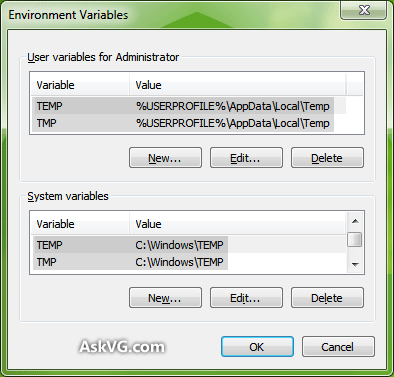
You can also directly access it using control sysdm.cpl,system,3 command in RUN dialog box.
Windows XP Environment Variables
| Environment Variable | Path |
| %ALLUSERSPROFILE% | C:\Documents and Settings\All Users |
| %APPDATA% | C:\Documents and Settings\Username\Application Data |
| %COMMONPROGRAMFILES% | C:\Program Files\Common Files |
| %COMMONPROGRAMFILES(x86)% | C:\Program Files (x86)\Common Files |
| %COMSPEC% | C:\Windows\System32\cmd.exe |
| %HOMEDRIVE% | C:\ |
| %HOMEPATH% | C:\Documents and Settings\Username |
| %PROGRAMFILES% | C:\Program Files\ |
| %PROGRAMFILES(X86)% | C:\Program Files (x86)\ (only in 64-bit version) |
| %SystemDrive% | C:\ |
| %SystemRoot% | C:\Windows\ |
| %TEMP% and %TMP% | C:\Documents and Settings\Username\Local Settings\Temp |
| %USERPROFILE% | C:\Documents and Settings\Username |
| %WINDIR% | C:\Windows\ |
Windows Vista, Windows 7, Windows 8/8.1 and Windows 10
| Environment Variable | Path |
| %ALLUSERSPROFILE% | C:\ProgramData\ |
| %APPDATA% | C:\Users\Username\AppData\Roaming |
| %COMMONPROGRAMFILES% | C:\Program Files\Common Files |
| %COMMONPROGRAMFILES(x86)% | C:\Program Files (x86)\Common Files |
| %COMSPEC% | C:\Windows\System32\cmd.exe |
| %HOMEDRIVE% | C:\ |
| %HOMEPATH% | C:\Users\Username |
| %LOCALAPPDATA% | C:\Users\Username\AppData\Local |
| %PROGRAMDATA% | C:\ProgramData\ |
| %PROGRAMFILES% | C:\Program Files\ |
| %PROGRAMFILES(X86)% | C:\Program Files (x86)\ (only in 64-bit version) |
| %PUBLIC% | C:\Users\Public\ |
| %SystemDrive% | C:\ |
| %SystemRoot% | C:\Windows\ |
| %TEMP% and %TMP% | C:\Users\Username\AppData\Local\Temp |
| %USERPROFILE% | C:\Users\Username |
| %WINDIR% | C:\Windows\ |
NOTE: Here C: is the system drive where Windows is installed in your system. It might differ for you if you installed Windows in a different drive in your system.
Advertisement
HOW TO ACCESS ALL THESE IN VISUAL BASIC .NET , PLEASE REPLY
Thank you was looking all-around for this..
This has been very helpful. Thank you very much 5stars
‘VB.NET code:
Dim strTempFolder As String = Environ(“TEMP”)
@ Abhishek….and any one else interested…
search “Environment.GetEnvironmentVariables Method”.
@ ABHISHEK
Try something like this. Very simple
Dim strDir As String
strDir = Environ(“APPDATA”)
MsgBox strDir
There is also %USERNAME% on Windows 7 at least.
thank you very much very helpful……
My desktop files is not recognised as internal or external cmd