
How to Disable “Homegroup” Feature in Windows 7 and Later?
Recently an AskVG reader asked how can he remove “Homegroup” icon from My Computer window in Windows?
“Homegroup” is a new feature in Windows which allows to share files and printers on a home network quickly and easily. The Homegroup can be accessed using Windows Explorer. Its displayed in Navigation pane as shown below:

Advertisement
Now the important thing is that not all people are going to use this new feature. If you have a single PC and don’t want to use this feature, why not disable it and save some system resources? Yes, Homegroup runs 2 services in background and you can stop those services to free some valuable system resources.
So today in this tutorial, we are going to tell you how to disable “Homegroup” feature in Windows? So without wasting any time, lets start the tutorial:
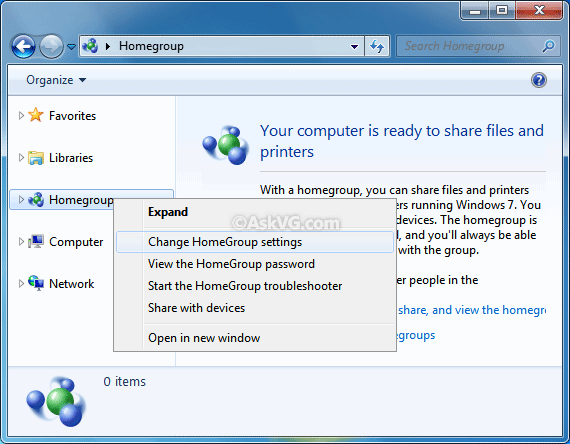
1. Open Computer and right-click on “Homegroup” icon present in Navigation pane and select “Change HomeGroup Settings“:
2. Now click on “Leave the homegroup…” link given at bottom.

3. It’ll ask for confirmation, click on “Leave the homegroup” button.
Advertisement

4. After that, close Explorer window. Now type services.msc in RUN or Start Menu Searchbox and press Enter. It’ll open “Services” window.
Here look for following 2 services:
- HomeGroup Listener
- HomeGroup Provider
Once you find them, double-click on each and change the “Startup type” to Disabled. Apply the changes and exit from Services window.

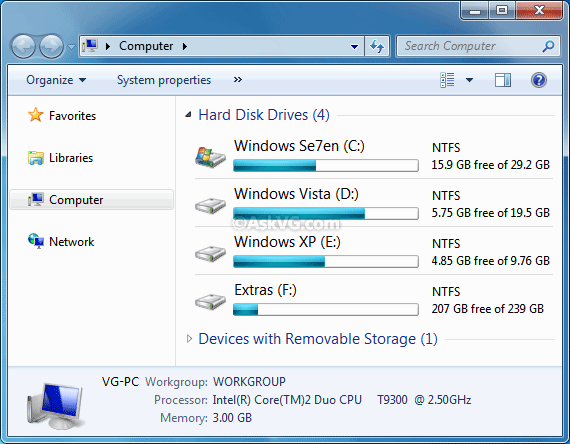
5. That’s it. It’ll permanently disable “Homegroup” feature and its icon will also be removed from Windows Explorer:
Also Check:
How to Remove “Homegroup” from Windows Explorer Navigation Pane?
its bloggers like you who make the world a happier place to live in..thanks !
Thank you VG for a concise explanation of how to get rid of this.
Some people may not be able to leave homegroup , if you have starter or home editions they have severely cut down networking .
If you arent in a homegroup and are using workgroup / server networking then you wont see the option to leave homegroup – use the reg file to remove the icon and go into services and disable the two services ( one will probably on manual and not started one will be active so stp then disable both )
If you access services.msc as a standard user, only one service is shown and it can only be stopped, nit disabled. When I ran as administrator, I was able to shut down both services. The homegroup icon is no longer shown in the navigator. Thank you for this tip!
Homegroup is the worst ting Microsoft created. Never work for me over all years and I read the manual tons of time.
Thank you I have absolutely no need and your blog made getting rid of it easy.
hi if i get rid of homegroup will i still be able to use my wireless printer thanks Dennis G
Did not realize what I was doing and after creating and joining a Homegroup it messes with my network big time (NAS and other computers go missing). I can not leave this homegroup now. When I try I get an error. I tried disabling the two services and then to leave but same error message. How do I get rid of Homegroup so my Network works like it used to??
Thanx.
THANK YOU!! I have room mates who create Homegroups and I did not want this. Thank you for helping me disable this service!
i am stuck on a job. 12 computers. 1 vista, 2 win 7 & 9 win 10. they have all been relocated from another address. 2 of them are new (both win 10). My problem is getting everyone visible on the network and removing the phantom login requirements that nobody knows about. The main problem is being thrown up by 1 (win 10) pc that require username and password to one of the win 7 devices. however random pcs get random requests for login details at random times. can i just remoe all credentials from all pcs and start again or does anyone know how or where to find the correct help. i have trawled the internet far and wide and found nothing that helps…
I did all of the above, and the home group kept reappearing along with the two home group process being reactivated. Very frustrating. If anyone knows what’s causing this I’d be forever grateful.
I really appreciate your help here with this.
I don’t want or need a homegroup or network, (according to in my limited definition anyway.)
I understand the malware security issue is why there is ADMIN, USER, GUEST..but I don’t care, the constant confusion with duplicates here and empty files there…It is not worth being tangled in someone else’s paranoid trip…I do not even use a password lock. No, I don’t regret it..I have security on other levels …In my human head.
Please…I would appreciate it very much if someone would tell me how to simplify my files on windows 7…
I just want full control of my computer 64bit acer windows 7 as owner, user, to very simply hold my stuff …which is nothing that special… in one group of files being of music ,video.
No Guests or “you need administrator permission” making me look over my shoulder like a kid wanting to draw on the walls..lol
This is all I want ,need, care to have to begin with.
Me the owner, Admin etc.etc.
music, pictures and video files
wifi printer connect with or without internet, and streaming music
Thank you so much for your human attention. It is a valuable thing.
An instructive post. People to really know who they want to reach and why or else, they’ll have no way to know what they’re trying to achieve. People need to hear this and have it drilled into their brains.
Thanks for sharing this great article.
I accidentally activated homegroup and now I cannot access my music, videos & pictures folder in PC
VG, Thank you so much for taking the time to do this. I appreciate you more than I can say.
I finally gave up the ghost of XP (only because I began having trouble with websites), found Windows 10 completely unusable, and have installed Windows 7 pro 64-bit as a last ditch effort to see if MS made a halfway usable OS after XP.
Mostly because of the Libraries fiasco (what a great way to thoroughly mess up your storage system and lose stuff) (but also because of the other useless and confusing “virtual” folders such as HomeGroup, etc.), I was about to move to Linux, when I found your instructions here. So I’m trying to see if I can get everything to more or less work as I want before taking that leap.
Every time I tried to save a folder (by clicking the “Save” icon so it would just save it back to the folder I got it from), but instead of saving it, it would open “Libraries” and want me to FIND the folder again. I’m hoping this will fix that time-wasting glitch.
Making it a pain to try to access/use certain folders or to try to put file & folder icons on the taskbar seems like MS trying to dictate how it’s customers are supposed to work.
Trying to find something that halfway works well FOR THE OS CUSTOMER after using the wonderful XP has been a nightmare. I know I’ll have to move to Linux eventually – there is no way in this world I’ll ever put the likes of Windows 10, with it’s psychopathic/sociopathic control fetish, back on anything of mine.