
Registry Tweak and Freeware to Enable Secret Animation in Windows 8 Start Screen
We all know about the new Start Screen present in Microsoft’s latest OS Windows 8. Its a replacement of the good old Start Menu of Windows OS. It shows tiles of installed and built-in programs with live previews.
When you boot into Windows 8 and login using your username and password, the Start Screen appears with a smooth animation but this animation is shown only once i.e. at first login. After that if you switch to Start Screen from Desktop or from any other app, the animation is not shown by Windows.
But there is a simple Registry tweak available which can be used to force Windows to show the animation each time you access Start Screen. There are also Registry tweaks available to customize this animation such as user picture, username and tile offset.
Advertisement
Following is a preview of the animation which you’ll get after following this tutorial:
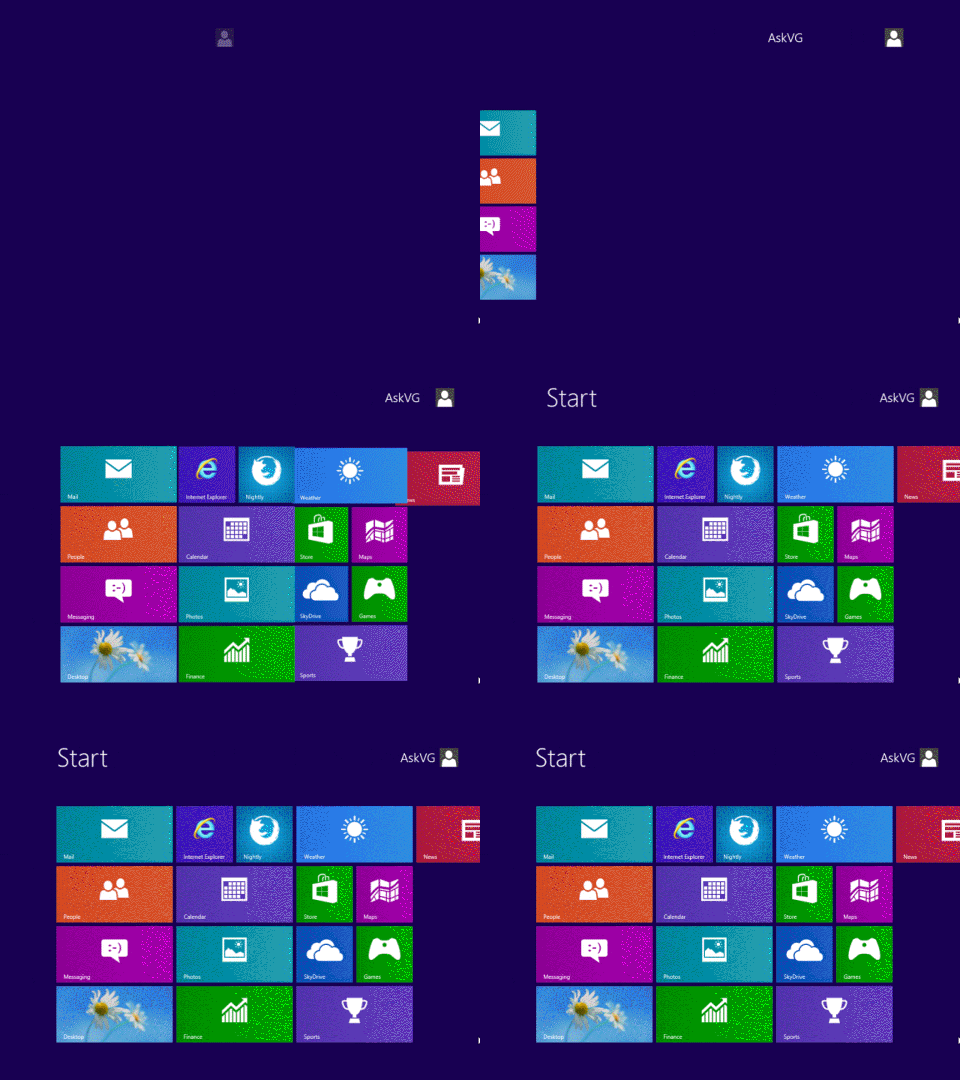
If you want to enable this secret animation in Windows 8 Start Screen, follow these simple steps:
A. Registry Tweak to Enable Animation in Start Screen
1. Press “WIN+R” key combination to launch RUN dialog box then type regedit and press Enter. It’ll open Registry Editor.
2. Now go to following key:
HKEY_CURRENT_USER\Software\Microsoft\Windows\CurrentVersion\ImmersiveShell\Grid
3. In right-side pane, create a new DWORD Launcher_SessionLoginAnimation_OnShow and set its value to 1
Advertisement
4. That’s it. It’ll immediately enable the animation in Start Screen.

5. You can also customize this animation settings with the help of following additional DWORDs:
Launcher_SessionLogin_Icon_Offset – You can create this DWORD to set the offset for user picture shown at Start Screen. You can set its value to 1000.
Launcher_SessionLogin_IconText_Offset – You can create this DWORD to set the offset for user name shown at Start Screen. You can set its value to 2000.
Launcher_SessionLogin_IndividualTower_Offset – You can create this DWORD to control the “far” left corner of Start Screen from where Tiles will fly during animation. You can set its value to 1000.
Launcher_SessionLogin_Tower_Offset – You can create this DWORD to control the right position from where Tiles slides to their regular positions. You can set its value to 100.
The above DWORDs will also be created in the same place as mentioned in step 2.
PS: If you don’t like the changes or face problems, you can restore default settings by simply deleting the new DWORDs created in steps 3 and 5.
B. Freeware to Enable Animation in Start Screen
You can also try following free portable utility to do the task automatically:
“Start Screen Animations Tweaker” is a free software for Windows 8 which allows you to enable the hidden secret animation in Start Screen. You just need to enable and customize the given options and then apply the changes.
It also comes with an option “Recommended settings” which contains predefined optimal settings that can be used as a starting point. It also allows you to restore default settings if you don’t like the new changes.
The utility works fine in both 32-bit and 64-bit versions of Windows 8. You can download it using following link:
Download Link
UPDATE: Many people have faced various problems like Explorer crash, Metro apps not opening, etc after using this tool so we have decided to remove the download link.
Also check out:
It’s full of bugs…apps are not opening properly after enabling this animation
i use 64 bit windows 8. should the DWORD value be of 64 bit ???
^^ No. Create normal DWORD.
@Abhinay
Worked fine here while testing.
Makes explorer crash for me. Also makes metro apps not work.
During opening apps explorer restarts always
i dont hav windows 8 on my PC but, DAMN… animation looks sorta glitchy.
During opening apps explorer restarts always..why this is happen???
Windows 8 Explorer crashes repeatedly. It comes a day after applying this patch. Whenever any metro app is opened it restarts the explorer.
Da Win+Tab shortcut won’t work after this…
for me it already look like that (in faster) without modify anything
The reg tweak worked fine on my Surface RT. The software of course, doesn’t.
When I used the first trick to make animaton, it worked but Soluto showed me a small report about windows explorer crashing.
@d6k5d3,
The 64 bit menu voice you are talking about, is *Q*WORD, not *D*WORD.
😉
dont try this! even it is good but makes the os lagging and some of the things like store,etc. dont even open.really bad
Metro apps from Windows Store not working properly
The apps did not open properly. I had to delete all the keys created.
after tweaking my regedit, this action destroyed my start menu animation. now i’m having a hard time reverting back.
^^ You can simply delete the DWORDS created in the tutorial to revert back to default settings.
No more animation effects or nothing after changing all you said. Why.? not even after restarting.
What it made my computer so frickn slow but good thinking
dude it’s already active without registry!!!!