
How to Always Show “More Details” in File Transfer (Cut, Copy, Delete) Dialog Box in Windows Vista and 7
Finally the wait is over! Almost all Windows Vista and 7 users wanted to achieve it.
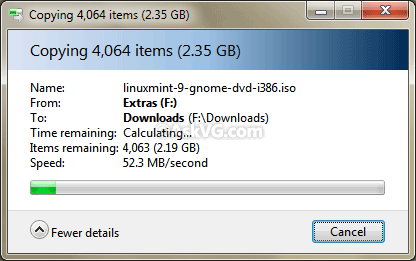
When you cut, copy or delete a file/folder in Windows Vista and 7, it shows a file transfer dialog box. There is a button “More Details” shown in the dialog box which expands the dialog box upon clicking and shows more details like file name, speed, etc.
Advertisement
The problem is that even if you click on “More Details” button, Windows forgets your choice and shows the default dialog box with “Fewer Details” activated, next time you perform a file transfer operation.
So how to force Windows to always show “More Details” in file transfer dialog box?
Here comes our favorite “Classic Shell” again to the rescue!
Simply download Classic Shell using following link:
After installing it, click on the “Classic Explorer Settings” button present at last of the toolbar in Explorer. If you don’t get the Classic toolbar in Explorer after installing the utility, press “ALT” key to show Menubar, right-click on it and select “Classic Explorer Bar” option.
Now enable “Always show more details” option present in “File Operation” tab and Apply it.
Advertisement

That’s it. Now whenever you perform a file transfer operation, the progress dialog box will be automatically expanded to show More Details.
would u happen to know how to remove the “safe run shared folder” on the my computer window. its from kaspersky but there’s no option to hide it on the program’s settings. i never use it and its just an eyesore, no important reason or anything but any kind of help would be awesome. thanks
^^ Check following:
https://www.askvg.com/how-to-remove-nokia-pc-suite-folder-web-folders-my-sharing-folders-or-other-unwanted-items-from-my-computer/
I just had to leave a comment here this is by far this best patch to the windows explorer i have seen in my many years of working on computers. I personally had created a tiny little WINDOW HOOK to automatically click the “File Copy” process window in order to show more details because it was so irritating to not see what was going on. So i take my hat off and give a 10/10 for this program and all its additional features. Peace…
How can I activate the Always Show Details In Windows 10 – there doesn’t seem to be any File Operation tab visible?
Not Windows 10, but Windows 7, How do I see the ink supply each time I print?