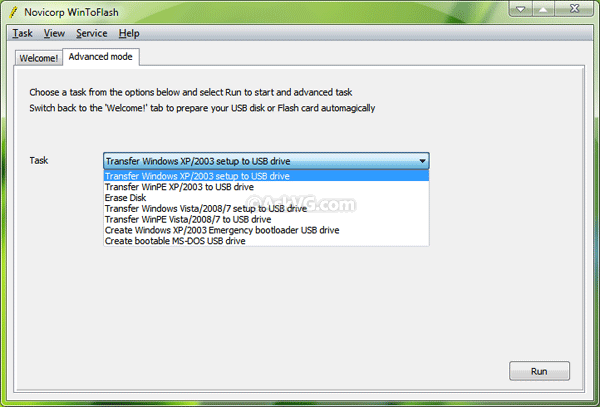
WinToFlash is a free software to create bootable USB drives for Windows XP, Server 2003, Vista, Server 2008 and 7 setup. Now no need to install Windows using CD/DVD drives. Simply attach your USB stick and run the installation.
This is about you can install your Windows from flash drive, USB pen, HDD, etc to your computer or netbook.
And this is not all it can do. WinToFlash can also transfer your live CD or DVD to USB card, for example, BartPE. After all you can erase your USB media and format it with Windows for every day use.

Features list:
- Windows XP/2003/Vista/2008/7 to USB transfer
- WinPE to USB transfer
- USB media erasing, full or quick
- Create the USB drive with emergency boot loader
- DOS to USB transfer
You can also take a look at some other similar free tools to create bootable USB drives to install Windows using following link:
Ultimate Collection of Best Freeware to Create Bootable USB Drive to Install Windows and Linux
This article was posted by VG in following section: Software, Windows 7, Windows Vista, Windows XP.
If you enjoyed this article, you can subscribe to our RSS feed or free newsletter to get all new articles directly in your Inbox. Also check out our most popular articles and archive to read other interesting articles. If you have some news or tip to share, please send us.
Aravind PS
I need to create UBCD in flash drive. will this Application help?
A.Muqeet
Looks great to me. Thanks, VG.
arkazain
Maybe a stupid question, but I can still use the disc after this right?
Mandeep
@arkazain Yes. You can still use the Windows CD/DVD. :)
------------------------------------------------------------------
How to boot from the USB Drive? What should be the BIOS settings for installing OS from a USB Drive?
VG
^^ Your BIOS must support booting using USB. You can set it in Boot order or similar section in BIOS settings.
V
I tried it earlier & it worked too but it was extremely low speed process, it took atleast 4 times more time on USB than from a CD!!!!
I don't know what was reason but I tried it on several college systems and also on my high speed PC it took almost same time if anyone else also face same speed problem please mention also if anyone can mention its solution also....I checked it with a good speed(10-30 Mb) sandisk pendrive on my own high speed PC and my college systems with almost same time...
Asad Irfan
I have transfered my windows xp setup in flash drive and my system also supports usb boot but still when i restart my system it shows no such notification for installing windows xp .
Can anyone help me Pleaseeeeeeeeeee!!!!!!!!
Answer me briefly that how to install after transfering.........
Arjun
In reference to V's problem, many BIOS support USB booting but still some support only USB v1.1. I think your BIOS is recognising the flash drive as USB 1.1 device and so the slow speed. The solution to your problem is to laod Plop boot manager from flash drive. Its a small linux kernel that supports USB 2 (EHCI). Methods to install Plop can be found through Google.
ultimarhain
if i made it bootable, will it be back to normal after using it?
VG
^^ If you are talking about USB drive, just format it and it'll be back to normal.