
Download Windows XP Mode Final Version for Windows 7
“Windows XP Mode” is an interesting feature of Windows 7 operating system which has been specially designed for businesses to help them in easily upgrading to Windows 7 by providing additional compatibility for their older applications. With the help of Windows XP mode, users can run and launch older Windows XP programs directly from a Windows 7 desktop even if the program in not compatible with Windows 7.
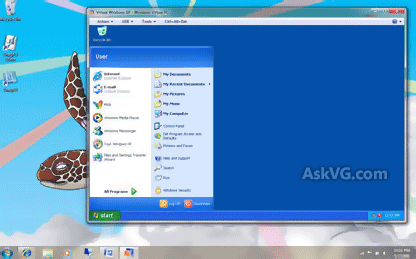
Windows XP mode is similar to virtual machine software such as Oracle Virtual Box or VMware Workstation.
Advertisement
Recently final version of “Windows XP Mode” was released to MSDN and TechNet subscribers and today Microsoft has released it to public.
Its available absolutely free to download and can be downloaded using following link:
Download Windows XP Mode RTM for Windows 7
NOTE: Windows XP Mode requires Windows 7 Professional, Ultimate or Enterprise editions. It also requires additional 1 GB of RAM, 15 GB of available disk space, and processor capable of hardware virtualization with AMD-V or Intel VT turned on in the BIOS.
Also Check:
[Direct Download Links] Windows XP Mode and Windows Virtual PC for Windows 7
Advertisement
Can you give me a link for a standalone installer for each of the following: Windows xp Mode
Windows Virtual pc
Windows xp Mode Update.
^^ Here you go:
https://www.askvg.com/direct-download-link-official-links-to-download-windows-xp-mode-and-windows-virtual-pc-for-windows-7/
win xp was perfect