
Windows 8 Comes with Built-in Option to Turn On/Off 16-Bit Application Support
UPDATE: This feature is only present in 32-bit edition of Windows 8.
Time to share another interesting feature of Windows 8. Did you know Windows 8 comes with a built-in option to turn on or off 16-bit application support?
Our reader “Basil” has found a new applet “16-Bit Application Support” in Control Panel of Windows 8 Developer Preview. This new applet allows you to enable or disable 16-bit application support in Windows 8.
Advertisement
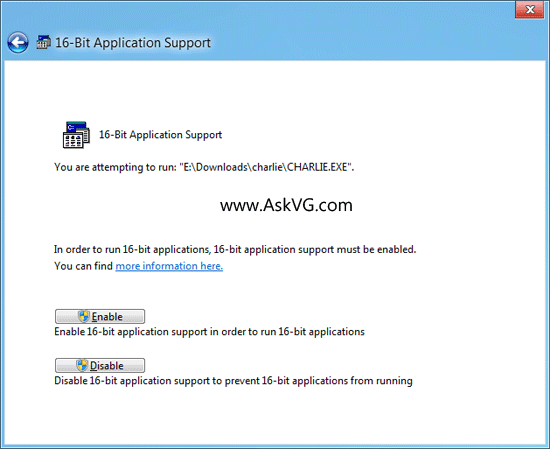
When you open the applet in Control Panel, Windows shows a dialog box to turn 16-bit application support on or off. Simply click on Enable button and you’ll be able to enjoy 16-bit applications in Windows 8.
If you don’t enable the option using Control Panel, Windows 8 automatically asks you to enable the option whenever you try to run a 16-bit application.
Not being able to run 16-bit code under a 64-bit operating system isn’t a Windows limitation, it’s a CPU architecture limitation.
You can run 16-bit code under 32 bit emulation under a 64- bit OS though 🙂 So on 64-bit Windows the solution is to use a virtualized copy of MS-DOS, Windows 3.1, or 32-bit Windows. You can download “XP Mode” from Microsoft on the business Windows editions of Win 7 and Win 8, which runs under Virtual PC. It’s decent. There are other similar solutions.
I have an special 16-bit application which has also 32-bit parts. It runs now under Windows 8, but not under Windows 7. The file dialogs locks the application on Windows 7.
give some updates to solve the 16 bit app defects in win7…!
and include the win xp mode in upcoming service packs of win7.
can u able to locate were will i find the 16-bt applicate turn on or off
can u able to tell me the location in windows8 16-bit application
The solutions here are just perfect!! You great guys.. Thanks for sharing
Go to “Control Panel”, Search for “16-bit Application Support”. you will see the link and you will be able to enable 16-bit Applications.
I have a 64-bit Windows 8 laptop and want to play these 16-bit games I have. Is there an emulator or something that I can use?
There is no 16 bit application support applet in control panel of win 8 pro 32 bit. I don’t know from where Basel come up with this …No body noticed that except him you should verify this and remove his announcement it waste the time of others
I withdraw my previous comment. Yes the 16 bit applet exist but not within the control panel croup. You have to search control panel for the expression “16 bit application support” after that you will find it on the upper right corner under heading ” programs and features”. Click on 16 -bit application ” you get the applet. But don’t click on programs and features you will not find it there. Sorry Basel I apologize from you.
I have searched for “16 bit application support” in control panel and get nothing. Using Windows 8, 32 bit.
Please advise. Thanks.
i am running windows 8 pro, it came with 16bit app support and i enabled it, and currently i began programming some assembly using nasm and nasmIDE, it assembles fine but when you run the program, it crashes and says ntvdm.exe is incompatible.
here is a detailed error message:
Log Name:
Source:
Date:
Event ID:
Application
Application Error
18/01/2014 19:39:32
1000
Task Category: (100)
Level:
Keywords:
User:
Computer:
Description:
Faulting application name: ntvdm.exe, version: 6.2.9200.16384, time stamp: 0x5010a5c1
Faulting module name: unknown, version: 0.0.0.0, time stamp: 0x00000000
Exception code: 0xc0000005
Fault offset: 0x00000118
Faulting process ID: 0x1f80
Faulting application start time: 0x01cf14743883adf7
Faulting application path: C:\Windows\system32\ntvdm.exe
Faulting module path: unknown
Report ID: 7c918498-8067-11e3-aff9-74de2b51f5e7
Faulting package full name:
Faulting package-relative application ID:
Event Xml:
1000
2
Error
Classic
N/A
coxy-man-HP
100
0x80000000000000
233451
Application
coxy-man-HP
ntvdm.exe
6.2.9200.16384
5010a5c1
unknown
0.0.0.0
00000000
c0000005
00000118
1f80
01cf14743883adf7
C:\Windows\system32\ntvdm.exe
unknown
7c918498-8067-11e3-aff9-74de2b51f5e7
@b
“Not being able to run 16-bit code under a 64-bit operating system isn’t a Windows limitation, it’s a CPU architecture limitation.”
Actually it isn’t. The WINE project has no such limitation when running 16bit Windows programs on a 64bit Linux based OS. Windows has a limitation because Microsoft chooses to not enhance* its NTVDM to work on 64bit OSs.
WINE uses protected mode for executing 16bit code, winehq.org/docs/winedev-guide/architecture –see the table. Microsoft’s NTVDM uses virtual mode for executing 16bit code, support.microsoft.com/kb/817901 –see More Information. A 64bit OS can have the CPU enter the 16 bit compatibility mode, which is similar to protected mode with the major exception being that it cannot then proceed to enter a virtual mode. WINE isn’t affected by this limitation whereas NTVDM is.
*: Actually, this might already exist. In the above linked support page, there is mention of code that does not use virtual mode; however, it is untested as of Windows 2000.
One can enable NTVDM going to Control Panel -> Turn Windows feature On/Off -> Legacy Component -> Check mark NTVDM
msdn.microsoft.com/en-us/library/windows/desktop/dn323745%28v=vs.85%29.aspx
Please tell in detail that in which tab or which side?
Thank you
Interesting find while trying to run Charlie the Duck.
“…. enable NTVDM going to Control Panel -> Turn Windows feature On/Off -> Legacy Component -> Check mark NTVDM”
Sorry, there’s no NTVDM option in my Win 8.1u1 (x64). (OS came pre-installed in new PC.)
FWIW, losing 16-bit driver support has meant junking a heap of gadgets such as compact digital camera interfaces, a snaky web-cam, a tripod-mountable web-cam etc etc. Back in XP, I just fired up IrfanView, selected the relevant TWAIN source and slurped data. At least IV still works !!!
A/A,
For Dennis and Dawood, go to the control panel of Windows 8 or 8.1, and write only 16 in its search box….. You will find the 16-Bit Application Support in Programs and Features…….
You could downgrade to Windows 8.1 32-bit, or just buy a copy of Windows 32-bit and virtualize it if you need to support web-cams, etc.
Actually it isn’t. The WINE project has no such limitation when running 16bit Windows programs on a 64bit Linux based OS. Windows has a limitation because Microsoft chooses to not enhance* its NTVDM to work on 64bit OSs.
Well…. wine WAS broken by 3.14 was it? Which was caused by Intel basically saying “you know, we aren’t REALLY supporting 16-bit anymore… just pretending to… and we have lots of bugs in protected mode because we’re not expecting people to use it… so if you could go ahead and block 16-bit programs that would be great”
Yes, later editions fixed it; but the point about cpu manufactures “Being absurdly lazy to implement the TINY 8080 instruction set correctly” is correct.
my asus desktop windows 8.1, on windows features, there is no ntvdm section because of my 64bit pc! I think..
So to solve this issue, I have created 25GB virtual drive on my hard disk and installed win 7 32-bit and run the dos -based 16 bit application no trouble at all.
I would have prepared to run it without going into virtual drive. it looks 64-bit machine does not allow it..
when i open 16 bit application in control panel it shows some errors like
foumd.exe/——-
please help me friend
writing a letter in search box restarts explorer. windows 8 64.