
[Review] What’s New in Windows 8?
We all know that Microsoft has released final RTM version of its latest OS “Windows 8” and its available for purchase or download to general public. Interested people can download a free 90-day trial version of Windows 8 RTM using following link:
Download 90-Day Trial Version of Windows 8 RTM Absolutely Free
Or you can purchase Windows 8 using following link:
Advertisement
How to Download or Order Windows 8 Setup DVD Online?
Windows 8 comes with lots of new features and enhancements such as new Metro UI, Ribbons in Windows Explorer, Start Screen, etc.
Today in this topic, we are going to share all new features and interesting changes which we found in Windows 8. So without wasting time, lets start the review of Windows 8 RTM:
Table of Contents
- Windows 8 Setup Tutorial or First Sign-in Animation:
- Windows 8 Boot Screen:
- Windows 8 Boot Loader:
- Windows 8 Login Screen or Welcome Screen:
- Windows 8 Start Screen:
- Windows 8 Desktop:
- Windows 8 Explorer:
- New Aero Lite Theme, Old Windows Basic Theme Replacement:
- New Aero Auto Colorization Feature:
- New SmartScreen Filter for Windows Explorer:
- Windows 8 Task Manager:
- Windows 8 Lock Screen:
- Windows 8 Metro Control Panel:
- Internet Explorer 10:
- New File History Feature in Windows 8:
- Windows 8 Recovery Feature:
- Windows 8 BSOD (Blue Screen of Death):
Windows 8 Setup Tutorial or First Sign-in Animation:
Since Microsoft has made some major changes in Windows 8 such as removal of Start Menu and Start button and introduction of hot corners to access Charms Bar, etc, many new Windows 8 users might face problems in finding the new stuff.
To help them, Microsoft has added a new animated tutorial (aka First Logon or Sign-in Animation) which is shown when Windows setup is finished and Windows is creating user profile and preparing the Desktop. The animation shows some images containing the text “Hi, while we’re getting things ready, check out the new way to use Windows” to help users how to access Charms Bar and other new features.

This animated tutorial is actually an HTML file called “FirstLogonAnim.html” which is stored in “C:\Windows\System32\oobe\” folder.
Advertisement
You can press Alt+F4 keys together or simply press Esc key to skip this tutorial.
If you want to completely disable this first sign-in animation for all new users, you can do this by setting “Show first sign-in animation” to “Disabled” under “Computer Configuration -> Administrative Templates -> System -> Logon” section in Group Policy Editor (gpedit.msc).
You can also turn this animation off by setting value of EnableFirstLogonAnimation DWORD to 0 under following key in Registry Editor (regedit):
HKEY_LOCAL_MACHINE\SOFTWARE\Microsoft\Windows\CurrentVersion\Policies\System
Windows 8 Boot Screen:
Microsoft has changed the boot screen in Windows 8 RTM. The new boot screen is minimal as usual and shows new Windows 8 logo which Microsoft shared recently along with a simple circle animation to show boot progress.

Windows 8 Boot Loader:
In past whenever you did a dual boot between two Windows OS, the boot loader used to show just after the BIOS logo and before any Windows boot. But Microsoft has changed it in Windows 8. Windows 8 boot loader is shown after Windows 8 boot screen that means first Windows 8 starts and then you see the boot loader to select desired Windows from the list.
Windows 8 boot loader follows Metro UI and shows the installed Windows OS as tiles. It also provides other useful options and tools to troubleshoot your system.

You can use your mouse cursor to select the entries. It also allows you to change the timer and default boot entry which is a welcome change.
Check out following interesting topics to learn more about this new boot loader:
- How to Access and Use Windows 8 Metro Boot Loader and Advanced Boot Options?
- [Fun Tip] Access New Metro Boot Loader While Running Windows 8
- How to Disable New Metro Boot Loader and Bring Back Windows 7 Style Boot Loader in Windows 8?
Windows 8 Login Screen or Welcome Screen:
Windows 8 login screen is very simple and clean. It shows a big tile containing your user avatar along with your username and password box if you have set the password:

Windows 8 Start Screen:
As soon as you login, the new Start Screen is shown which contains live tiles of all installed programs along with system tools such as Windows Explorer, Internet Explorer, Desktop, etc. You can use your mouse to scroll between tiles. A scrollbar is also shown at the bottom to scroll between tiles.
If you click on your username or avatar shown at the top-right corner of Start Screen, you get a few options to change user tile, lock, log off or add new user.
Check out following articles to learn more about new Start Screen:
- [Windows 8 Start Screen] How to Pin, Unpin, Resize, Move and Search Tiles
- [Tip] Organize Windows 8 Start Screen Tiles in Groups and Name These Groups
- How to Change Icons and Text Labels of Start Screen Tiles in Windows 8 and 8.1?

In Windows 8 testing versions, Start Screen was not very customizable and you had to modify system files to change its look-n-feel. But in Windows 8 RTM version, Microsoft has added customization options for Start Screen. You can choose Start Screen background from a given set of images. Also you can change Start Screen color by selecting a color from given list. If you want to set your desired wallpaper as background image of Start Screen, check out following articles:
Customize Start Screen Background, Change Number of Rows of Tiles and Charms Bar Color in Windows 8
Make Windows 8 Start Screen Transparent, Change Background Image and No of Rows of Tiles
If you don’t like the new Start Screen and want to skip or bypass it at startup, check out following tutorial:
How to Skip Metro Start Screen and Boot Directly into Desktop in Windows 8?
Windows 8 Desktop:
To access Desktop, you need to click on Desktop tile given in Start Screen. Windows 8 Desktop looks similar to Windows 7 Desktop.
A big difference which you’ll notice is the removal of good old Start button from Taskbar. Microsoft has replaced Start button with a small Start Screen thumbnail which is shown when you move your mouse cursor to bottom-left corner of screen:

Clicking on the thumbnail lets you go to Start Screen again. If you want to get the good old Start button and Start Menu back in Windows 8, you can check out following topic:
List of All Free Software to Get Start Menu and Start Button Back in Windows 8
When you right-click on bottom-left corner, it shows a hidden Quick Access Menu (also called Win+X Menu) which provides easier access to a few useful system tools:
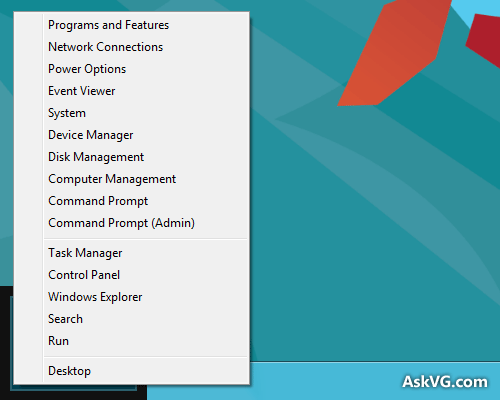
You can check following exclusive tutorial to customize this new Quick Access Menu in Windows 8:
Customize New Quick Access Menu (Win+X Menu) in Windows 8
If you move your mouse cursor to top-right corner or bottom-right corner of screen, you can access new Charms Bar where you can access Search, Share, Start, Devices and Settings charm.

Actually Microsoft has introduced new hot corner feature in Windows 8 which shows Start Screen thumbnail, app switch list and Charms Bar when you move your mouse cursor to bottom-left, top-left and top-right (or bottom-right) corner of screen respectively.
If you don’t like these new hot corner features and want to disable any or all of them, check out following article:
How to Disable Hot Corners (Charms Bar, Start Screen Thumbnail, App Switch List) in Windows 8?
Since Microsoft has removed Start Menu from Windows 8, you can’t select power options like restart, shut down, etc from Start Menu. You can use following tutorial to add these power options in Desktop context menu for easier access:
Add Restart, Shut Down and Other Power Shortcuts in Desktop Context Menu of Windows 8
Or check out our exclusive app which provides direct shortcuts to these power options:
Shutdown Panel: Freeware to Provide Easy and Quick Access to Power Options in Windows
Windows 8 Explorer:
Windows 8 Explorer is quite similar to Windows 7 Explorer. Microsoft has added the good old “Up” button and Office 2013 style Ribbon UI to Windows 8 Explorer which allows quick access to various system tasks. Windows Explorer in Windows 8 also shows program name and icon in titlebar. Program name is shown in the middle of titlebar.
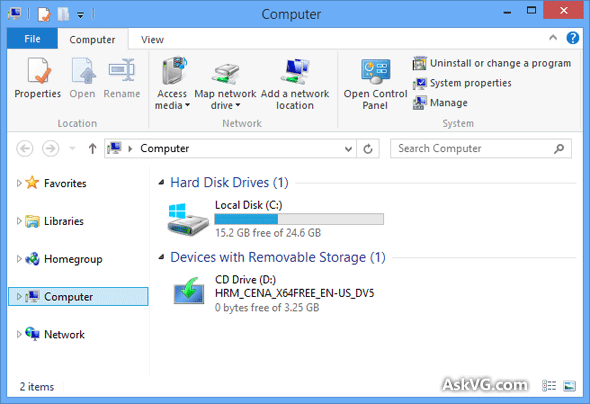
Microsoft has removed Aero glass transparency from Windows 8. You can check following topics for more info:
- Is There Any Way to Enable Aero Glass Transparency in Windows 8?
- Finally a Way to Enable Transparency in Windows 8 Without any Bug or Glitch
Without Aero glass transparency, the window borders don’t look nice. You can get thin window borders in Windows 8 using a simple Registry tweak as mentioned in following tutorial:
Registry Tweak to Decrease Window Border Size and Padding in Windows 8
If you don’t like ribbon UI, you can minimize the ribbon. You can also put Quick Access toolbar below the ribbon to use it like a standard toolbar as mentioned in following tutorial:
How to Get Windows XP Style Toolbar in Windows 8 Explorer without Using Any Software?
If you want, you can disable ribbon UI and get Windows Vista and 7 style command bar back in Windows 8 Explorer using simple methods given in following article:
5 Easy Ways to Remove Ribbon from Windows 8 and 8.1 Explorer
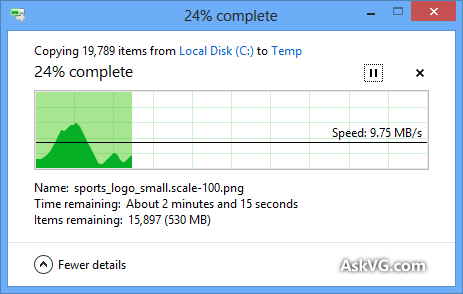
Windows 8 Explorer also comes with new improved file management UI. The copy / move dialog box has been redesigned. Now you can pause/resume the copy/move operation.
New Aero Lite Theme, Old Windows Basic Theme Replacement:
Microsoft has replaced old Windows Vista and 7 “Windows Basic” theme with new “Aero Lite” theme in Windows 8. If your computer doesn’t support Aero interface, Windows 8 will use Aero Lite theme by default.

“Aero Lite” theme is not shown in Desktop Personalization window if your system supports default Aero theme, but you can get it back using following trick:
How to Enable Hidden “Aero Lite” Theme in Windows 8 RTM?
You can also enable Aero glass in this new “Aero Lite” theme. Actually its a glitch in Windows 8. For more information, check out following article:
Hidden Secret Trick to Enable / Activate “Aero Glass” in Windows 8 “Aero Lite” Theme
Update: The above trick no longer works in Windows 8 RTM.
New Aero Auto Colorization Feature:
Windows 8 comes with new “Aero Auto Colorization” feature which automatically configures the color of Aero elements, like Windows Explorer windows and the taskbar based on the desktop wallpaper. This option is available in Desktop Personalization window.

As you can see Microsoft has removed “Advanced appearance settings” option from Personalization window. You can access it using following tutorial:
How to Access “Advanced Appearance Settings” Option to Change Text Size in Windows 8?
New SmartScreen Filter for Windows Explorer:
Windows 8 comes with new “SmartScreen” feature which automatically warns you when you try to run an unrecognized program downloaded from Internet.

If you find it annoying, you can turn it off using following tutorial:
How to Disable SmartScreen Filter in Windows 8?
Windows 8 Task Manager:
Windows 8 comes with a highly modified Task Manager which is really an improved version of old Task Manager. New advanced Task Manager shows more details and comes with more tabs and options.
It also allows you to direct restart Windows Explorer which was not possible in earlier Windows versions.

Also check: [Tip] Tweak and Customize Windows 8 Task Manager Functionality
You can get a similar Task Manager in previous Windows versions with the help of our exclusive app “Windows 8 Task Manager“.
Windows 8 Lock Screen:
In previous Windows versions, login screen and lock screen used to same but in Windows 8 both are pretty much different. Microsoft has added a smartphone style lock screen in Windows 8. Following is the preview of Windows 8 Lock screen:
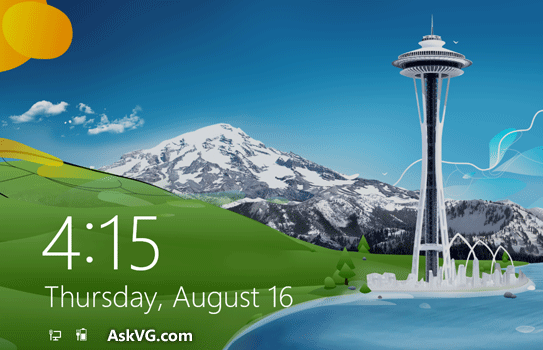
As you can see it shows the current date, time along with network and battery status. If you want, you can change lock screen background, date and time format as mentioned in following tutorials:
- How to Change Lock Screen Background Image in Windows 8?
- How to Change or Customize Day Name, Date and Time Format on Windows 8 Lock Screen?
If you don’t like new lock screen, you can disable it with the help of following guide:
How to Disable Lock Screen in Windows 8?
Windows 8 Metro Control Panel:
Microsoft has included a new Metro style Control Panel in Windows 8 which is called PC Settings. You can access it using Settings charm present in Charms bar.

The old classic Control Panel is still accessible from My Computer window. You can also launch it by typing Control in Start Screen or Run dialog box.
Internet Explorer 10:
Windows 8 comes with a new version of Internet Explorer which is version 10. IE10 comes with many new features, improvements and a few UI updates. You can check out following exclusive IE10 review to learn more about these new features and enhancements:
- [IE10 Review] What’s New in Microsoft Internet Explorer 10?
- [Tip] Enable New “Flip Ahead” Feature in Internet Explorer 10 in Windows 8
New File History Feature in Windows 8:
Windows 8 also comes with a new feature “File History” which automatically saves copies of your selected files so you can restore them if they’re lost or damaged. You can access this feature using Control Panel.

Windows 8 Recovery Feature:
An excellent new feature in Windows 8 is the “Recovery” feature which allows you to Refresh or Reset your PC.
Refresh PC option reloads Windows 8 without losing your files, photos, videos, music, etc. Its like reinstalling Windows but better than it as you don’t have to worry about your documents and files.
Reset PC option puts your computer back to the way it was originally. Keep in mind, it’ll remove all your files. It might come handy when you want to clean your hard disk due to virus infection, etc.

You can access this feature using Control Panel or PC Settings as mentioned in following tutorial:
[Tip] Reinstall or Repair Windows 8 and Later Using “Reset PC” and “Refresh PC” Options
Windows 8 BSOD (Blue Screen of Death):
Now something funny and interesting about Windows 8. It seems Microsoft has replaced the classic BSOD which was full of text with a new redesigned BSOD in Windows 8 which doesn’t show advanced details but shows a sad smiley face along with a line “Your PC ran into a problem that it couldn’t handle, and now it needs to restart“.
The error code is also shown below the line and it suggests you to search for the error code online:

We accidentally got this new BSOD while trying to install Windows 8 using VMware Player. Although the new BSOD looks nice but its not better than the classic BSOD present in previous Windows versions. The old BSOD used to show more details which was helpful in identifying the issue quickly and easily.
UPDATE: Microsoft has released a new hotfix “KB2929742” for Windows 8 to disable this new smiley face BSOD and bring back the classic BSOD with full details. First download the hotfix using following link:
Download Hotfix to Replace New BSOD in Windows 8 With Classic BSOD
After installing the hotfix, open Registry Editor using regedit command in RUN dialog box and then go to following key:
HKEY_LOCAL_MACHINE\System\CurrentControlSet\Control\CrashControl
In right-side pane, create new DWORD DisplayParameters and set its value to 1 to show classic BSOD with stop error information in Windows 8.
If you don’t want to install Windows 8 in your system but want to test its new features, you can install it in a virtualization software. It’ll not install Windows 8 in your system and will not affect your already installed OS. It’ll install it virtually. Check out following article to learn how to install Windows 8 in Virtual Box or other virtualization software:
How to Install Windows 8 in Virtual Box or VMware Workstation?
Also watch following exclusive video showing the complete Windows 8 installation process in just 2 minutes:
And don’t forget to check out other interesting and useful articles in our exclusive Windows 8 section.
That’s all for now guys! Feel free to post your comment and let us know what do you think about Windows 8 new features and our review…
Also Check:
[Review] What’s New in Windows 8.1?
Hidden Secret Features and Useful Hotkeys in Windows 8 and Later
I loaded the consumer preview into Virtual Box on my windows 7 machine and it’s alright but I will definitely be sticking to windows 7. I wish they would retain the start menu and instead make a second menu that brings out the metro UI. Eh or make 2 versions of windows 8 (7 classic styled) and (8 metro UI tablet UI styled). That I think would be better so people who want the new get the new and those who want to keep the 7 style get the style of 7 with all the improvements of 8 without metro UI add ins.
I tested it on a Virtual Machine and sincerely hated. I do not have a touch screen and anything I tried to do spent a lot of mouse clicks, it’s really counterproductive.
Would be nice if Microsoft had implemented these various improvements in Windows 7 while maintaining the interface.
I always said “I’m against living in the past and innovations are part of evolution” but in this case, I’m not so sure. I still prefer my Windows 7 but only the future will tell which way to go. (maybe wait for Windows 9 or 10)
What I really liked was the new Explorer Ribbon UI, very useful indeed.
Another thing that bothered me was the fact that I have to put various personal information such as my hotmail password and other things, this is a gold mine for hackers, that who knows when, can invade my machine and have access to my personal data.
I’ll wait a little longer …
Thanks for the very comprehensive review.
I have installed the CP and have mixed feelings. I like the metro interface but the implementation in desktops seems to be counter productive. For example, I have opened a video file from my folder in Windows Explorer, the metro player (i dont like it) have started playing the video. I pressed Alt+ F4 and closed the player. Instead of getting back to the explorer window, the system displayed the Metro start screen. It is really annoying to me. The issue remains in Outlook attachments as well… after opening an XPS document from my Outlook mailbox, the system displays the metro start screen instead of going back to the Outlook window after i close the XPS document viewer.
I am going back to Windows 7 till I get the default start menu in Windows 8. I am impressed with some of the improvements in Windows 8 like the new File Copy/Move, Task Manager, etc.
Thanks VG, for the wonderful review…
Good Luck Windows 8 Users…
Congrats for Task Manager and Copy/Paste Dialog. I haven’t tried the other new features so I will come back here to post my comments on them.
LOL wat is dis ??
Is dis mobile or Tablet OS for a PC !!
Microsoft is Kidding Nowadays
i like Win8. this is what i need, something new for my eye 😉 i cant use windows for a long time with the same interface.
it’s nice if you don’t care about the look, it looks old.
maybe they want it to be as successful as windows 3.11 for workgroups.
anyway this site shares a lot of ways to make win8 look better.
Now that they’ve cleaned up some of the wierdness I think it’s a viable OS. It would be nice to have the option to disable the start screen. I hope that comes in the RTM build. Otherwise I think it’s going to be a decent OS. Like a minimal 7. If/when I do get it, I will be adding a start menu using one of the available freeware tools.
despite the metro style the release preview lots better than the consumer
oh ya the trick to enable aero lite glass still there and taskbar “bug” as previously posted by VG still there too 🙂
Don’t forget about the new busy cursors. They’re more simple, unlike the ones in Windows Vista and 7.
can u tell how to remove a serial from windows 8?
^^ I have not checked it but it should work. Use at your own risk:
1. Open regedit and go to:
HKEY_LOCAL_MACHINE/Software/Microsoft/Windows/CurrentVersion/Setup/OOBE/
Change value of MediaBootInstall to 0
2. Now run following command in Command Prompt:
slmgr /rearm
3. Restart your system and now it should remove the product key and you should get an unactivated Windows with 30 days trial period.
I love it more & more… I will gonna upgrade to Windows 8 as soon as available…
Why peoples like the up button if there’s a Bresdcrumbs???
i hate it because its look very ugly and not match with toolbar
VG, what are the different editions of Windows 8 and what are the differences? Thank you.
^^ Here you go:
https://www.askvg.com/microsoft-announces-windows-8-skus-3-editions-windows-8-pro-and-enterprise-also-talks-about-windows-rt/
The only thing I don’t like about the new Task Manager is that on the “Processes” tab (the tab with the heat map), the memory values in the memory column is of “Memory (Private Working Set)”, not “Working Set: (Memory)”.
So, in the processes tab, you don’t see the true amount of RAM some process is using, usually it is slighter larger and sometimes a much larger value in real life. You can see the true value in the Details tab if you have the “Working Set: (Memory)” column.
1 other little gripe is that the new task manager is a bit bloated, needs a bit of code refinement. It takes about 1 seconds to load up on a 3GHZ Core 2 duo machine even if cached in memory (not hard drive bottleneck). About 3 seconds if not in RAM yet. The Windows 7 Task Manager was a lot smaller program.
All in all I like the new task manager, it adds a lot of usefulness and the slowality really is a big deal since I’m a speed freak and my next computer will probably have 3x the single core performance so it’ll be super fast again.
thanks a lot this video helped me know how to install windows 8
Thanks VG, for the wonderful review…
Good Luck Windows 8 Users…I’m using Windows 8.1 RTM
I’m sad to know that MS does’nt optimized Windows 8 for its own virtualization app in Windows 7, Windows Virtual PC & made it optimized for other vm apps. Many people are unable to test this OS including me. I prefer it because it is faster to download/install.
I hate to say but Windows 8 still have some confusing features. AIt’s better to say that windows 7 is easier to manage because everytime I connect to the internet it just stop and it says “Restart file explorer normally.”
That’s why I cant use my PC for a long period.
Please Windows Fix this.
sir,
i want to install the .net software 3.0 but while installing an error occure please help me.
My post is not a comment but a problem. I am using a Dell GX 745 machine but because of power fluctuation of my generator, the machine goes off at random. I have a 3.0GHZ core 2 processor with 3.25GB of installed memory. I then decided to remove my hard drive, dvd writer and the graphic card with 1GB dedicated ram into a Lenovo desktop type 7408CC8 having the following particulars. CPU TYPE: Pentium (R) Dual Core E5400 @ 2.70GHz, CPU speed-2700MHz, CPU bus speed – 800MHz, Installed memory – 2GB, memory bus speed – 667MHz. The system experienced some minor problem during booting up, but later overcome this problem and boot well to desktop.
The main problem is that what I normally burn with Nero 15 for 7 minutes at most on my Dell machine took me 1 hour 1 minute on the Lenovo machine. Both machine have 64 bit processor but running 32 bit OS. The OS on my hard drive is Window 8 32 bit. My questions are (1) what went wrong that it took that much time to burn? (2) What can I do to make it fast as it was on the Dell machine?
I must let you know that after the burning was completed, the exercise of burning is successful, i.e I can open, read and copy the contents of the dvd rom. I checked the ATA Channel 0 properties under advance setting in device manager, these are my findings which I believe are right, 0 ATA Disk Ultra DMA Mode 5; 1 ATAPI Cdrom Ultra DMA M5. Both disk and dvd writer are Sata hardware. Any help will be highly appreciated. Thanks to you all over there.
^^ I’ll first advise you to uninstall and then reinstall Nero software. Also try some other alternative software:
https://www.askvg.com/the-best-free-alternatives-to-nero-cd-dvd-burning-software/
win 8.1running well