
Microsoft Windows Calculator Bug, Sqrt(4) – 2 != 0
Yesterday we posted about a bug found in Windows 8:
Windows 8 Taskbar Context Menu Bug
And now its turn of Windows Calculator. Almost all Windows users use the default Calculator application which comes preinstalled with Windows OS. But did you know it contains a bug which has not been fixed by Microsoft yet. This bug exists in almost all Windows versions including Windows XP, Vista, 7 and Windows 8.
Advertisement
The bug appears when you try to calculate following:
sqrt(4)-2
If you can’t understand the above mentioned equation, lets describe it in details. The above command first calculates Square root of 4 and then subtracts 2 from the result.
Square root of 4 is 2 and when we subtract 2 from it, the end result should be 2-2=0 but Calculator shows a long series of numbers in the result.
If you use the Standard mode of Calculator, the result would be displayed as -1.068281969439142e-19 and if you use Scientific mode, you’ll get the result as -8.1648465955514287168521180122928e-39 as shown in following screenshot:
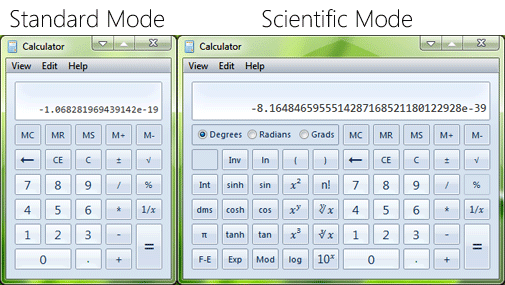
Its definitely a bug in Calculator. You might get different result in different Windows versions but the result will never be correct i.e. 0.
Advertisement
UPDATE: Finally Classic Square Root Bug Fixed in Calculator in Windows 10
Following video shows the bug live in action:
The only reason behind this bug which I can figure out might be the way computer calculates square root. The square root of 4 is calculated as 1.9999….. up to infinite by computer and it shows the result as 2 using the round off mechanism. And when we subtract 2 from the result, it actually subtracts it from 1.9999….. up to infinite and shows the big series of numbers in minus.
Anyway after all the facts or assumptions, its definitely a bug similar to Notepad bug which also exists in all Windows versions:
Notepad Statusbar Bug Found in All Windows Versions
Thanks to our reader “Anish Mehta” for sharing this bug…
Faced exactly the same thing in Windows 8 CP 64-bit. Great find. 😀
I know this bug is firstly seen in Youtube Video, User Name: wizaryan
Knew it long ago. Saw some “Windows XP Tricks” video, and XP showed like -2.042 etc. BTW, that was SP2. SP3 is same as Win7.
-8.1648465955514287168521180122928e-39 is another way to write -0.0000000000000000000000000000000000000081648465955514287168521180122928.
THIRTY-NINE zeros! I’d say that that’s accurate enough for most cases.
It’s not really a bug.
The calculator uses float data-type to manage the values. So, the numbers that “never ends” are never exact. The reason why it uses floats, is for efficiency. This “bug” exists in many advance calculators that you buy at the store, and under Windows, it existed possibly well before Windows 95.
IBM has a page on that:www-01.ibm.com/support/docview.wss?uid=swg21608991
The “bug” also appears in the calculator of Windows XP, which is a pretty lousy trig calculator – it has *NO* square root, sin, cos, etc. buttons. To compute the square root of a value you have to raise to a decimal- fraction exponent:
Sqrt(4) has to be entered as 4 ^ 2 [1/x] = and displays “2”… then subtract 2 and you get
-8.1648465955514287168521180122928e-39
same result as shown in the published example.
That is so strange!!!! I did this using Windows XP Calc and it just showed up with that. Did it with a REAL calculator and it totalled zero and not -8.16484etc.
There is a serious bug in this calculator (at least in the Dutch version): the calculator, when used in ‘standard mode’ does not know about standard precedence rules.
For instance
Standard mode: 1 + 9/40 = 0,25;
Scientific mode: 1 + 9/40 = 1,225 (which is the correct answer).
Maybe this is not a bug after all, but a feature…
If I may i’d like to explain why the scientific calculator has thes “problem”. It is true that the normal calculator has a bug. But you have to know that at a scientific calculator the brackets count. That means that the actual calculation would be: sqrt(4)-2 equaling to 0. Sorry Guys
It has basic error also.
For example,
5*5*5 + 3*3*3 should be 152 but windows 8.1 calculator’s answer is 1152 with standard mode.
It’s so stupid to use this calculator.
In Windows XP in standard mode its 8.1648465955514287168521180122928e-39 but in scientific mode I can’t do that.
This is unnecessary ranting, which lacks of a decent amount of investigation. There is no closed form to calculate the square root (pls see en.wikipedia.org/wiki/Methods_of_computing_square_roots), thus every square root you will ever be calculating is an approximation. Of course you can define special cases, such as 4, 9, 16, 25, 36, 49, 64, 81, 100, … but (a) this would mean, that you’d have to introduce some sort of semantics to a quite simple tool like the calculator, which would definitively be an overkill and (b) where do you stop? Anyone might complain, that 12398765-sqrt(153729373525225) is 5,3026330757729108494341053894116e-31 and not 0. [ironic]This definitively is a bug![/ironic]
You would not try to make any andvanced numeric calculation with the windows calculator. Would you? For literally every problem solved with the windows calculator -8e-39 will be sufficiently close to 0.
I just checked, and this same bug is in the windows 10 calculator! lol
This bug only occurs if the answer is supposed to be zero.
sqrt(4) minus any number other than 1 gives the correct answer
sqrt(9) minus any number other than 3 gives the right answer.
sqrt(25) minus any number other than 5 gives the correct answer
. . . . . and so on.
I am getting result 14 for 5 + 2 * 2. It that ok?
@Randy That is incorrect. The bug is in the SQRT op. When performing the same calculation twice, the result is the same. It is perfectly consistent. The problem is the result is not perfectly accurate. It would be good if we could see the bitwise representation of the results of the sqrt op.
The algorithm used is incapable of finding the root of several perfect square numbers. That is what we know.
Date Calculation is also wrong in default micro soft calculator as it is showing 1 day less while calculating for a period of one month or more days..
The weird point is why the result of 4^0.5 – 2 is different from sqrt(4) – 2, shouldn’t they have same algorithms of calculation?!
There is also another bug:
2+2*4 = 16 instead of 10
If you switch to scientific mode it calculates fine but in standard mode it doesn’t.
They disregard the priority of the operation.
Microsoft, can’t make even a simple calculator right 🙁
Ask Calc for Date Difference between 2016-03-26 and 2016-03-27
It says they are the same date!
>>> import math
>>> math.sqrt(4.0) – 2.0
0.0
>>> math.log10(10.0) – 1.0
0.0
>>> math.tan(math.radians(45)) – 1.0
-1.1102230246251565e-16
OH NO! THERE IS A BUG IN PYTHON!
This is not a bug. It is not IEEE 754 compliant, but it’s still not a bug. It’s just an implementation that doesn’t give a precise solution when there would be one. But no implementation is perfect.
“4 is calculated as 1.9999….. up to infinite by computer ”
Two things:
1) You think a computer would calculate something “up to infinite”? How long would that take? That’s obviously not how calc.exe does it. It would freeze.
2) “1.9999….. up to infinite” is exactly 2. calc.exe must get something close to it, but not 2. It’s strange that their implementation doesn’t get this right. But so what? It’s still floating point arithmetics, so it’s never precise. You could find examples for every calculator. Usually “0.3-0.1” is enough to get an unexpected result. And “0.19999999999999998” is actually IEEE compliant. And calc.exe gives you 0.2 for calculation.
Windows 3.11 doesn’t have this issue.
This glitch was also found on Windows 10.
Interestingly, if you calculate sqrt(4) – 1, the calculator will show 1. It must be how the calculator treats the value of zero.
Also %
Try:
400*150%=
I found this page after discovering the same bug but with the sin() function of the calculator. If you take the sin of 90 or 270 and then add or subtract 1 to try and get 0 it will instead give you 2.171… times ten to the -39. Interestingly if you take the sin of 270, the. Multiply it by 2, 3, etc, then add 1 to get to 0 the error number will also be multiplied by that value (so if you multiply by 2 it becomes 4.34… e^-39)
It makes me wonder how they calculate the value and store it in memory if you can manipulate this small error value like that.
And sqrt of 0 is showing -2, this is also wrong. Sqrt of 0 should be 0.
Windows calculator updated to version 10.1803.711.1000. Just now got this update in Windows 10 build 17133 RS 4 (v1803).
VG this bug was present in MS excel too. 🤔
^^ Yes. I added the update to changelog:
https://www.askvg.com/windows-10-redstone-5-rs5-builds-changelog/
same issue here with Windows 10 Fall Creators Update. Bug still exists