
AeroBar: Free Portable Utility to Show Titlebar Text in Windows Vista and 7 Explorer
UPDATE: Utility version updated to 1.3 which now allows you to easily enable/disable titlebar text. Run the utility once to show titlebar text and run it again to disable titlebar text. So now the utility acts like a switch.
Have you ever wondered why Explorer Windows don’t show titles in Windows Vista and 7? In earlier versions of Windows, we could see titlebar text in explorer windows but it has been removed in Vista and 7. Actually titlebar text was removed to make the Explorer clean and minimal.
But if you look carefully, other applications like Notepad, Paint, Internet Explorer, etc show the text in titlebar, so there must be a way to show it in Windows Explorer as well.
Advertisement
“AeroBar” is a very small and standalone application which can show the titlebar text in Windows Vista and 7 Explorer.
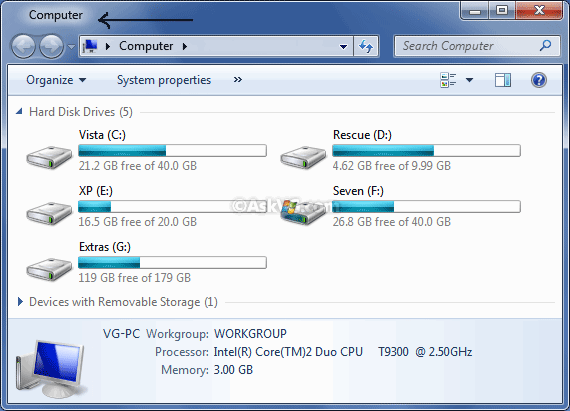
Simply download the utility, run it and you’ll see titlebar text in all Explorer windows. There is no need to install the app as its portable. If you like it and want to use it, you can add its shortcut in Windows startup.
To remove the titlebar text, run the utility again.
UPDATE: The software has been discontinued by the developer but you can try following more advanced tool to get the same feature:
How to Get “Up” Button and Titlebar Text and Icon Back in Windows Vista and 7 Explorer?
Advertisement
Hi, anybody here knows how to get the title in a different position? Exactly in the center of the title bar?
Hi, I cant find download link, is it still downloadable?
@Garik
Read info at the end of the article (UPDATE).
@zydrius32
Thanks, unfortunately i don’t need all the productivity of the “classic shell” tool.
AeroBar seems to be exactly what i need.
Maybe you know how i can contact the developer?
^^ The file was hosted at following link:
psscript.net/AeroBar.exe
But the site is down now.
I just Installed Windows 7 in one of old laptop and was searching some cool stuffs to customize my all time favourite Windows 7. Reach this post and –
I Found a working link to download this awesome tool –
mediafire.com/?lp55tnty1r1uw6w
1 more tweak with this tool – if you Rename AeroBar.exe to AeroBarIco.exe before running, it will also show icon along with title.