
Permanently Set and Save Process Priority in Windows Task Manager Using Prio
Do you know “Windows” shares the processor time between all running processes based upon their priority? If a process has higher priority, it gets more processor time compared to a process having lower priority.
But we can change process priority using “Windows Task Manager“. Open Task Manager by right-clicking on Taskbar and select “Task Manager” or by pressing “Ctrl+Shift+Esc” keys together.
Once you open Task Manager, go to “Processes” tab, right-click on any running process and change the priority using “Set Priority” menu. You’ll notice some system processes are set to “High” priority and almost all 3rd party processes are set to “Normal” by default.
Advertisement
Although you can change the priority according to your requirement, but the priority is not set permanently. Once you restart your system, Windows forgets your custom priority and assigns the process default priority.
So how to set a process priority permanent? Don’t worry, here is the solution.
“Prio” is a free for personal use utility which solves the problem. It adds a new option “Save Priority” in context menu:
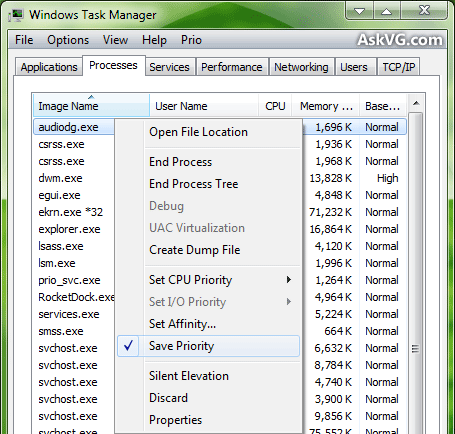
So now you can save the priority permanently.
It works in Windows XP, Vista and 7. It also adds a few extra features as mentioned below:
- Adds a new tab “Services” which shows the installed processes along with their status
- Adds another new tab “TCP/IP” which shows all established TCP/IP connections and all open ports
- Adds a new option “Silent Elevation” which allows you to execute a software with administrative privileges
You can download it using following link:
Advertisement
^^ Currently no but may be we’ll have one in future?
WoaW, thanks, very light and easy to install and works perfect on Win 7 64 bit.
Just need to restart PC and BAM save priority is in the task manager.
Just tested it with world of warcraft and after quiting and restarting the game it stays on high priority.
Many thanks for this awesome free app.
Priority reverts back to normal after closing the program. Win 7 64 bit
On Windows XP it has screwed up csrss.exe default priority of high and set it to normal is that good or bad?
Thanks. Worked like a charm. Just have to restart the pc once to apply the save setting permanently for the particular game exe.
May I asking? is Set CPU Priority same as original Priority function? and what is Set I/O Priority??
does not save in windows xp x64bit Edition (2003) server Sp2
does not add any new tabs into task manger, after setting affinity with the save option checked and rebooting it’s still showing all 4 cpu’s checked.
I have a a way of starting a program in a specific priority in windows 7 and 8 and it takes alot less work than messing in the command prompt which is not natural for the average user.
First create a shortcut to the program. Right click your shortcut and select properties,, once the properties window opens type the following into the target line in front of the process.
Before change it should look something like this
“C:\Program Files\Ubisoft\Assasins Creed 3\AC3SP.exe”
Change it too read
cmd /c start/high AC3SP.exe and click ok.
Now you have a shortcut that will start in high priority every time.
After this is done you might want too change the icon cause it will resemble a command prompt. To do this just right click the shortcut and select properties then select the change icon button hope this sorts out the problem for all of you.
Regards Shaun
For Windows 8, I suggest you google “Process Lasso” – free version
Installed processlasso on win8.1
Works great.
This was very helpful. Thanks for including the pictures.
Does not work on my XP machine with foxfire. Task manager is unchanged. I really needed this utility.
I tried Shaun’s cmd change in windows 7 and it works a treat – Thanks a stack Shaun
Instead of setting my priority program to High, I set all the other programs on my taskbar to Low so now my other programs run below windows processes so not affecting windows processes but using all the processor that is left after windows and my priority program gets to do what they must – I find this a more stable approach i.e. i went into the Taskbar on for example Firefox and right clicked Firefox, then properties and in Target typed “cmd /c start/Low Firefox.exe” and when I applied it the system changed it to “C:\Windows\System32\cmd.exe /c start/Low firefox.exe” and I left the “Start in:” as it was
Now firefox runs below windows and my priority programs
Doesnt work for win 7 if i set it to high,start and enter the game,check again its set to normal
In Windows Vista 64 bit the 64 bit version of Prio crashes task manager if I press the “show processes from all users” button. How do I get around this?
I had a program that would not run unless I manually set the Priority in Task Manager to RealTime. I wanted to make the setting permanent, so I downloaded this.
Not only did this not give me the permanent option in Windows 10, now even changing the setting manually, the program won’t run. Unbelievable.
thank you very much this is going to be of good help thank you
WORKS ON WINDOWS 10 🙂
February 2018 – Prio is working on a happily-tuned 64-bit Windows 7 box. Thank you 🙂
Win32.Trojan.WisdomEyes.16070401.9500.9842
^^ NOD32 didn’t find any suspicious item. Which antivirus are you using? It might be a false positive.
Can’t get it to permanently set processes on Win 10
You need to use Process Lasso, you can set any exe with any prioirty and it will set it even after a reboot.
Works perfectly on my win7/64/Ultimate pc! 🙂
Does not work in Windows 10 Upgrade Version 1903 – priority keeps shifting from low to above normal in the space of minutes…
Does it work for Windows 10?
where is “prio” for permanantly change.. i didint get it
is there a chance something like a prefetch file might contain all the settings for whatever exe file you run so like, if you can figure that out it might be possible to set the priority permanently for your own custom programs ?? Within the exe file itself is some kind of meta data that might also be where it is stored. however, for some strange reason, no one wants to talk about these potentially important programming issues. Microsoft does not want people to reverse engineer anything so they make it unbelievable hostile to want to program within their os without using their compilers. I do not like C or the like but basic or fortran and if necessary assembly. I miss the old days where one could learn the entire setup both software and hardware.
Works perfectly with 64-bit version on Win10.
Thank you!
For windows 10 I am on newest update and I got Prio to save settings by disabling UAC. Not sure if this will work for everyone but as soon as I disabled I rebooted and and my settings saved.