
How to Enable Tools -> Folder Options and Registry Editor in Windows
Many times Windows users face a common problem. The “Folder Options” in “Tools” menu is automatically removed or disabled in Windows Explorer. In fact you can’t access it from Control Panel. Also whenever you try to open “Registry Editor”, you get a message that its disabled by Administrator.
If you are also facing this problem, then you have come to right place. Follow the simple steps mentioned in this tutorial and your problem will be solved:
1. If Folder Options is disabled but Registry Editor is still working in your system, then you can enable Folder Options by editing Windows Registry. Type regedit in RUN dialog box and press Enter. it’ll open Registry Editor, now go to following keys:
Advertisement
HKEY_CURRENT_USER\Software\Microsoft\Windows\Current Version\Policies\Explorer
HKEY_LOCAL_MACHINE\Software\Microsoft\Windows\Current Version\Policies\Explorer
In right-side pane, check whether a DWORD value named NoFolderOptions exists or not? If it exists, delete it.

2. If you are not familiar with editing the registry, then you can simply download following file, extract it and then run the .REG file:
3. But sometimes Registry Editor is also disabled. Whenever you try to open regedit, Windows will show following error message:
Advertisement
Registry Editor has been disabled by administrator.
Its a symptom of “RONTOKBRO” Trojan. To remove this trojan, follow the instructions given in following topic:
Is Your System Infected with a Virus / Spyware / Adware / Trojan?
4. If its not a trojan problem and someone has disabled it intentionally in your system, then you can enable it again by using any of following 2 methods:
a. Type gpedit.msc in RUN dialog box and go to:
User Configuration -> Administrative Templates -> System
in right-side pane, set “Prevent access to Registry editing tools” to either Not Configured or Disabled.
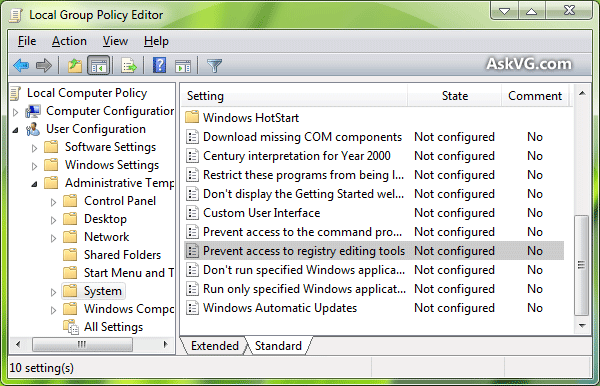
b. Just type following in RUN dialog box and press <ENTER>:
REG add HKCU\Software\Microsoft\Windows\CurrentVersion\Policies\System /v DisableRegistryTools /t REG_DWORD /d 0 /f
Now after enabling Registry Editor, you can re-enable Folder Options by following methods mentioned in 1st or 2nd steps.
Also Check:
[Solution] Options to Change Hidden Files and Folders Settings are not Available in Folder Options
[Fix] “View” Tab is Missing in “Folder Options” Dialog Box in Windows
Brilliant thanks . so simple when yo know how !
Thank you very very very Much it works 😀
Thank you very Much, very very very very Much
So VG,Do you have sumthn useful for Linux users too, eh?
keep goin’.you’re good….
^^ Thanks. I dont use Linux regularly but I have shared a few articles about Linux in past such as:
https://www.askvg.com/linux-guides-collection-everything-you-want-to-know-about-linux/
OMG after 3 hours i finded this site and these steps help me very very much! GJ man and thx
That’s pretty cool working.. Thanks you so much!!!! >.<
Though I tried all of given, when I open regedit.exe it shows Registry Editing has been disabled by ur Administrator though i am administrator
not working-disabled Registry error the service cannot accept control (1061) messages
all I click on, how to fix?
i was try your method but registrt editor is not enabled
That isn’t always the Case. Some viruses block access by closing the Regedit down after trying to launch it. IT blocks regedit.exe from running, so what you do is make copy of regedit.exe and rename it to regedit.com so I have read, which still works. BUT I figured why not make the new copy named reg.exe because if the virus is blocking it specifically by name, then you can name the new copy anyname.exe and it should work.
Followed your directions for removing and adding NoFileOptions in the registry. Must have done something wrong but the result still did not add File Options in Control Panel. Would you help me please?
thanks for the info., but it works for few min then back to same problem. show all white icons all drives and folder including network drives. do u have any solution pls update.
^^ Please post your HijackThis log file in following topic first:
https://www.askvg.com/is-your-system-infected-with-a-virus-spyware-adware-trojan/
more info on how to know the name of virus affecting a computer system
First time visiting your website, I really like your website!