
How to Enable or Disable Smooth Scrolling Feature in Google Chrome?
“Smooth Scrolling” is a very useful feature and can be found in almost all popular web browsers such as Mozilla Firefox, Internet Explorer, Opera, etc. Smooth Scrolling slides down the web page smoothly and helps you in reading a long web page easily. Without smooth scrolling, the browser directly jumps down one page and doesn’t look good.
Surprisingly, one of the most popular and widely used web browser “Google Chrome” doesn’t come with this basic feature. But did you know there is a hidden setting to enable this useful feature?
Today in this tutorial, we are going to share a small and easy to use trick which can be used to enable smooth scrolling feature in Google Chrome web browser. Thanks to our reader “TheAslan” for sharing this trick.
Advertisement
If you are a Google Chrome user and want to enable this feature, check out following simple steps:
1. Open Google Chrome, type chrome://flags or about:flags in addressbar and press Enter. It’ll open a secret configuration page of Google Chrome as mentioned here. It’s quite similar to Mozilla Firefox’s about:config page. It lets you enable or disable many hidden and experimental features in Google Chrome.
2. Scroll down a little until you see “Smooth Scrolling” option. It would be disabled by default.
3. Click on “Enable” link given under the option and then click on “Relaunch Now” button as shown in following screenshot:

4. That’s it. It’ll restart the web browser and you’ll be able to enjoy smooth scrolling in Google Chrome.
NOTE: If you can’t enable the above mentioned option, try to set “Accelerated overflow scroll” option to Enabled.
Advertisement
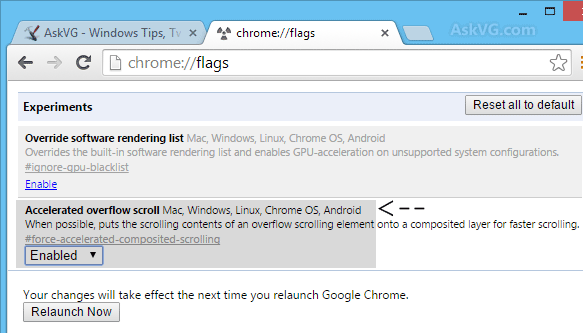
PS: There are many more hidden and interesting tweaks available in chrome://flags page, check them out.
Also Check: How to Enable Smooth Scrolling Feature in Opera Web Browser?
I’ve tried to emulate such behavior via add-ons,
but i wasnt happy with the results…
This is a great tweak, thanks Vishal! 🙂
Great job
here is a place where i can learn many more things
Should this work in Comodo Dragon (Chrome based browser)? When i type chrome://flags and press enter, it showing google search results for chrome://flags always.
about://flags opens chrome://flags too, it’ll redirect you there, it works in both ways =)
OK, now here’s a hidden feature in Opera: the Voice or Talk to Opera feature. With the help of this unique feature, you can tell Opera what to do or ask it to read a web page. Also note that this feature was not hidden before Opera 12; but it’s hidden in Opera 12 onwards. To enable it, go to opera:config > Voice XML > Voice XML enabled (check this). For voice settings/preferences, go to Preferences > Advanced > Voice…
@Ramesh.
Open Comodo Browser, type in url as dragon://flags. It works. For more type in url as dragon://chrome-urls
Its stable. Doesn’t create any problem. Its enabled by default on Android.
For Windows 8.1, enable this:
Accelerated overflow scroll Mac, Windows, Linux, Chrome OS, Android
When possible, puts the scrolling contents of an overflow scrolling element onto a composited layer for faster scrolling. #force-accelerated-composited-scrolling
It is disabled by default.
Restart the browser and enjoy.
My Logitech M705 wireless mouse was working fine and then I downloaded the most recent version of Set Point. Frankly, I have no idea what this software does because I never used it. I typically only use the large wheel in the locked position and scroll down lines at a time or I unlock it and let it slowly move down the page when I drag it a bit. Well, after this software installed, it no longer would smoothly scroll down the page when I dragged it and I tried every suggestion to get it to do what it had been. I was ready to give up when I decided just to uninstall the Set Point software and restart my computer.
PROBLEM SOLVED.
Well this is weird. On my Mac, it says smooth scrolling is not available. However, it IS smooth scrolling, and I HATE it, and cannot turn it off!
At least I assume this is smooth scrolling behavior: I click on a Facebook notification, it goes to the right page, then tediously scrolls down to where the appropriate comment is. What a waste of time and focus. Please just go there.
How old is this info? The ‘smooth scrolling’ isn’t on that page.
Hey, I followed the instructions but I don’t know how to enable the autoscrolling once I restarted. I’d love to hear how, thanks. I Have a Chromebook and I did not use a mouse.
DOESN’T WORK!!
Thank you so much, you are a star!
No idea when the ‘Smooth Scrolling’ info was published, but that doesn’t seem to work 2/22/2020, any ideas on a new fix?
And while you’re at it, do you have any idea how to fix Chrome from signing me out of when I close it? It signs me out of Gmail and every other Page I’ve signed into that in the past would have been signed in from previous sessions.
Thanks for the help!!
Doggone it, now I tried again via ‘about//Flags it WORKED!!! Thanks
But I still need help on the other issue if you have any idea. Thank you!
^^ Search for “Clear cookies and site data when you quit Chrome” in Chrome settings and make sure the option is disabled.
i enabled threaded scrolling. Problem solved
It works!
7/31/2020
If it’s not working, you’re doing something wrong.