
How to Create New Customized Toolbars at Desktop in Windows Vista?
Lots of Windows Vista users complain about not able to create new toolbars at Desktop as they used to create in Windows XP. Actually this functionality has been removed by Microsoft from Windows Vista.
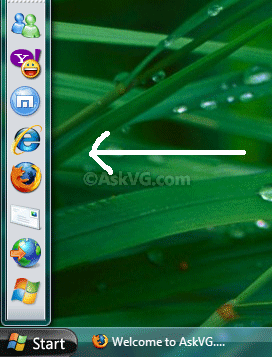
But don’t worry. In this tutorial, we are going to tell you a very simple way to create your own Desktop toolbars (Deskbars) in Windows Vista as shown in following screenshot:
Advertisement
As you can see the new toolbar at Desktop looks and works similar to a dock utility. Just follow these simple steps to create your own Desktop toolbars in Vista:
1. If you have My Computer icon on Desktop, drag and drop it at top of screen and it’ll automatically convert in a toolbar. You can also drag-n-drop it at left or right side of screen. Remember it’ll not work if you try to drag-n-drop the icon to the screen corner which contains the Taskbar. So if you have Taskbar at bottom, you can only drag-n-drop the icon to top, left and right to create a Desktop toolbar.
2. Alternatively, you can also create a new folder on desktop and then drag-n-drop it. It’ll also create a toolbar.
3. Now you can add more toolbars in this new toolbar by right-clicking on empty area on the toolbar and select “Toolbars” option.
4. You can also drag-n-drop icons in the toolbars to re-arrange them.
5. You can also change other settings like:
Show Text
Show Title
View -> Large Icons
View -> Small Icons
Always on Top
Auto-Hide
Advertisement
6. To close the toolbar, right-click on it and select “Close Toolbar“. Or you can drag-n-drop it at desktop and then click on Close button.
VG!
Please, I beg you, what is the name of the theme in the screenshot? It looks like a Longhorn one?
^^ Its AeroVG theme for Windows Vista:
https://www.askvg.com/gallery/
Thank you.
I have been trying to remove a desktop folder toolbar for some time, you made simple, easy and quick to do.
Once again
Thank you
Alan