
How to Get “Up” Button and Titlebar Text and Icon Back in Windows Vista and 7 Explorer?
Almost all Windows Vista and 7 users complain about missing “Up” button and Titlebar text in Windows Explorer toolbar. We have blogged about “Mavis Up Button” which can bring back the “Up” button but its not free, you need to pay $4.95 to purchase it.
We have also blogged about “AeroBar” which can bring back the titlebar text back in Windows Vista and 7 Explorer.
The good news is that our favorite tool “Classic Shell” can also bring back the good old “Up” button as well as titlebar text and icon in Windows Explorer as you can see in the following screenshot:
Advertisement
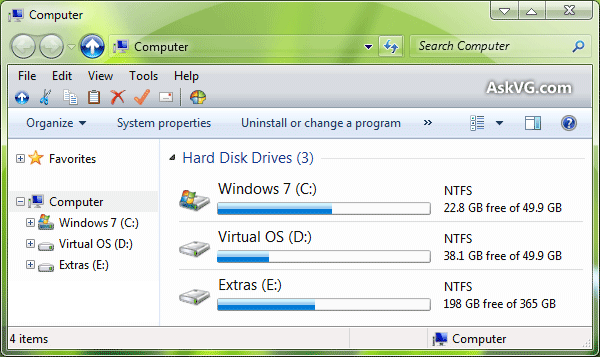
We have already blogged about it in past. When we blogged about this tool, it only provided Classic Start menu, Classic Explorer toolbar buttons and a few other things. But now a new version is available which comes with following changes:
- Shows Titlebar text and icon
- Disable Addressbar Breadcrumbs
- Adds “Up” button in Explorer titlebar
- New toolbar icons to match Vista and 7
- New skins for Classic Start menu
- Brings back file size feature in Statusbar
First visit following link and download Classic Shell:
Classic Shell: Get Classic Start Menu & Explorer Toolbar Buttons Back in Windows Vista & 7
Install it and open Windows Explorer. Now click on the “Classic Explorer Settings” button present at last of the toolbar in Explorer. If you don’t get the Classic toolbar in Explorer after installing the utility, press “ALT” key to show Menubar, right-click on it and select “Classic Explorer Bar” option.
Now go to “Title Bar” tab and enable “Show caption in the title bar” and “Show icon in the title bar” options and Apply the changes.

Advertisement
To enable “Up” button, go to “Up Button” tab and enable “Show Up Button” option and Apply the changes.

That’s it. Now you’ll have Up button and titlebar text and icon back in Windows Explorer.
How can I get the same up button as in W8?
^^ Classic Shell allows you to change the icon.
Has anyone created an up button that matches the windows 8 (ExplorerFrame.dll) navigation buttons from the theme https://www.askvg.com/download-windows-8-rtm-theme-for-windows-7/.
Getting tired of messing with ico files and trying to get the transparency correct 🙁
I’m looking for an up arrow in the circle.
I want to get the Windows 8 Style Up Button
How to make the titlebar text in center…
No how do i remove the, i dont remember what it was called. The File, edit, view, tools bar at the top.
If a user already has a start menu replacement (such as Ordinarysoft StartmenuX) wouldn’t there be a problem with installing Classic Start Menu just to get the up arrow? I would like to have the up arrow but not at the cost of losing the StartmenuX tool. Has anyone tested or know the outcome so I do not have to go through the risk?
Thanking you in advance;
Thanks a lot.
Great Plugging for VISTA/7