
Download Windows XP Luna, Royale Blue and Zune Themes for Windows 7
We here at AskVG love Windows customization and we regularly share awesome themes, skins, boot screens and other eye candy stuff for Windows users.
Most of our readers including us are using Windows 7 at the moment and we have posted many Windows 7 themes in past which can be found in our exclusive Themes and Wallpapers section.
There are many Windows 7 users who still love the Luna or Royale Blue theme or dark Zune theme present in Windows XP:
Advertisement
Download Royale Blue, Noir, Zune and Embedded Themes for Windows XP
The good thing is that almost all these classic Windows XP themes have been ported to Windows 7 and Windows 7 users can enjoy these ported themes in their system.
After getting frequent emails containing request for a Windows XP theme for Windows 7, today we decided to put all these themes together in a single topic for your convenience.
So today in this article, we are going to list all Windows XP themes which have been successfully ported to Windows 7. So lets share the themes without wasting time:
Table of Contents
Windows XP “Luna” Theme for Windows 7
If you are using Windows 7 but miss the good old blue “Luna” theme of XP, here is something interesting for you.
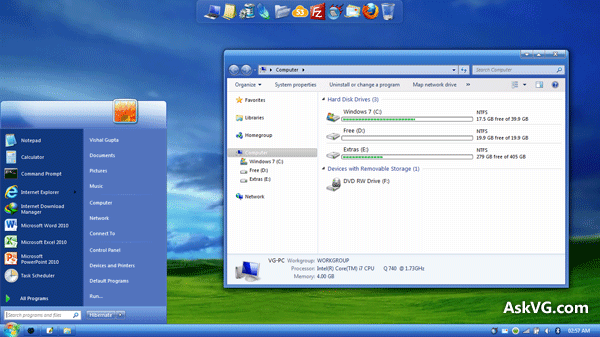
Following is an excellent theme for Windows 7 users which will help you in transforming Windows 7 into Windows XP as shown in following screenshot:

Advertisement
This theme really makes Windows 7 look-like Windows XP. The theme looks great and provides same XP feeling in Windows 7.
You can download this theme using following link:
Download Windows XP “Luna” Theme for Windows 7
Also check out following Windows 8 Metro style Luna theme for Windows 7:
Download Windows 8 Metro UI Inspired Windows XP “Luna” Theme for Windows 7
Windows XP “Royale Blue” Theme for Windows 7
“Royale Blue” theme is one of the most famous themes for Windows XP. It was an official Windows XP theme from Microsoft which was introduced in Windows XP Media Center Edition.

If you want to use it in Windows 7, you can download it using following link:
Download Windows XP “Royale Blue” Theme for Windows 7
Windows XP “Zune” Theme for Windows 7
“Zune” theme was also officially released by Microsoft for Windows XP users. It was created by Microsoft to promote its Zune player. This theme was based on “Royale Blue” theme.

You can get the same theme for Windows 7 using following link:
Download Windows XP “Zune” Theme for Windows 7
Download Windows XP “Luna”, “Royale Blue” and “Zune” Remix Themes for Windows 7
One AskVG reader “djeos546” created remix versions of Luna, Royale Blue and Zune themes for Windows 7. He combined the ported XP themes with our exclusive Windows 7 theme “AeroVG Se7en” and the output was really impressive.
You can download these remix versions from following link:
Download Windows XP Royale Blue, Luna and Zune Remix Themes for Windows 7
If you also like Windows XP themes, you should definitely give a try to the above mentioned themes. Feel free to share your feedback about these themes in your comment.
NOTE: Go through following tutorial which describes how to use 3rd party themes in Windows 7:
How to Install & Use 3rd Party (Custom) Themes in Windows 7?
Also don’t forget to check out our exclusive gallery page to find awesome themes, skins, wallpapers and icon packs for Windows, Yahoo! Messenger and mobile phones:
Also check:
Download Windows XP Luna, Royale Blue and Zune Themes for Windows 8/8.1
Download Windows XP, Vista, 7, 8/8.1 and Longhorn Themes for Windows 10
Using Resource Hacker…
I want to learn how.
Can you refer me to the right posts – so I can learn step by step how to do it?
^^ Check following:
https://www.askvg.com/tutorial-all-about-resource-hacker-in-a-brief-tutorial/
^^ You’ll need to check the PNG resources in msstyles file.
I need more details. Here are 2 files I found in my Laptop:
C:\Windows\winsxs\amd64_microsoft-windows-aero_31bf3856ad364e35_6.1.7601.17514_none_0a0916fa3009208a\aero.msstyles
C:\Windows\winsxs\amd64_microsoft-windows-aero.resources_31bf3856ad364e35_6.1.7600.16385_en-us_963b743473b55a81\aero.msstyles.mui
There are thousands of PNG resources. How Do I know which PNG resources I need to replace. Nobody did it before me?
^^ You need to modify C:\Windows\Resources\Themes\Aero\aero.msstyles file. I cant remember the exact resource number.
That’s Ok.
I am monitored to this article so when anyone has the exact resource number in future, please post here.
OR
if you have expert friends refer me to…
Thank You
^^ I checked the msstyles file and following are the resources:
Image -> 1014-1017 and 1024-1027
I tried, but I could not do it alone. Explorer gets stuck. There is something new that you can help me?
Here, I found something that could take us a step forward:
w7forums.com/attachments/2180d1292888799-remove-glow-taskbar-capture.png
w7forums.com/remove-glow-taskbar-t9223.html
If anyone knows professionally edit these PNG files doing something cool, and share with us, we thank him greatly.
Hi VG,
I got a Windows 7 Home Basic netbook. My son accidentally change my taskbar icons together with the start button to windows xp format. How can I switch it back to windows 7 format?
^^ It seems he installed a transformation pack to change Windows 7 look. You should check in “Control Panel -> Programs and Features” and All Programs list for transformation pack entry. If you find it, uninstall it.
I checked on the programs and features for a transformation pack entry,but I could not found any file for it, I’m just wondering because he able to change it while the pc is locked. He tried to unlocked but he got incorrect password. When I look back on the PC screen it went from blue windows 7 to all black already and when I login with my password the taskbar coloured change to silver and windows flag on the start button change to the word.
^^ First try to re-apply default Windows theme using Desktop Personalization. It’ll bring back the default look.
Hi VG
Thank you very kindly for your efforts here. I came to fix my accursed “TrustedInstaller” issue and have stayed an extra hour or two looking through your other contributions. Now I come upon these XP Theme for win7 links. Glorious day. I now have XP and Win7 in the home and what a difference. Win7 (and now Win8) may be fine for the iPhone crowd which spends it’s days checking social networks and sending each other photos of their unmentionables but it is a weak sister to those of us who actually have work to do which involves anything more complicated than starting Office or Internet Explorer. At least now I can have a familiar face when I am traveling the obstreperous back alleys of Win7 spending hours in what takes only a few minutes on XP. Sigh. The King is nearly dead, long live the King! LoL 🙂
Vishal , Why the Luna Theme did not Apply the Start Orb ?
TNX
^^ Because Start ORB images are stored in Explorer.exe file not in .msstyles file. You’ll need to replace existing Explorer.exe file with the new one to apply new Start ORB.
is it based on basic and high contrast theme?
Hello~ I’d like to download the Windows XP Luna for my Windows 7, but I read somewhere that I have to “patch” my computer first to be able to download the theme? Since I don’t read that anywhere in this post, is that true?
^^ Please check following:
https://www.askvg.com/how-to-install-use-custom-3rd-party-themes-in-windows-xp-vista-and-7/
I’d like to download the Windows XP Luna for my Windows 7,
Hello there, I have followed the instructions, but I still get the classic win 98 style taskbar, not the xp one, is there any way to fix this?
heloo,,,it is not working on my pc.when i applied thes it looked like win7 home basic.
hey VG on royale and zune how can i change start burron to xp?
.-. Can’t at least ONE of these be for Vista?
^^ You can try following:
https://www.askvg.com/vista-blue-refresh-theme-for-windows-vista/
Hi VG.
On the page about the Embedded Theme for XP, I commented about porting it to Windows 7.
You might want to consider adding this link.
jakezxx.deviantart.com/art/Windows-xp-Embedded-theme-for-windows-7-port-590532244
If link doesn’t work, let me know. My port, along with everything on my HDD, was lost during the BSOD 0x00000ED UNMOUTABLE_BOOT_VOLUME
Good Morning!
First of all, congratulations on the magnificent work.
I have a question: is there any way to put this windows 7 hd usage progress bar on windows xp?
Because I definitely need to continue to use xp, first of all I passionately love this system. And secondly, because I have hundreds of old programs that only work on it.
I love the look of windows vista, however one of the files I use most (an audio player called VUPlayer) despite working on it, does not play files in ogg format and I have hundreds of songs in this extension.
To browse I use a version of Linux (Linux Mint) so I no longer have to worry about migrating to a newer version of windows, not least because I use Linux to browse and the files I download from the internet (photos, audio files , video and pdf) I transfer to the pen drive to use them on my pc where my windows xp is.
If you can answer me, even if it’s a short email response, I appreciate it. Because for my xp to really look the way I wanted it, it was just missing this spectacular feature that I mentioned, that despite being something purely visual, it would really make it the way I always dreamed of.
A hug!
^^ Check following article:
https://www.askvg.com/transform-your-windows-xp-in-windows-vista-without-any-customization-pack/
is this compatible with windows 11 ?
^^ No. These themes were released for Windows 7 only.