All About Microsoft Office 2010 Technical Preview, Screenshots Inside


http://img.photobucket.com/albums/v374/vishaal_here/Microsoft_Office_2010_Logo.png

Just finished installing "Microsoft Office 2010 Technical Preview". Its available on Microsoft Connect so if you applied for it, check your Inbox or Connect account and it should be available for download.

Both 32-bit and 64-bit versions are available. The available version's build number is 4006.1110

File size of 32-bit version is 535.87 MB and 64-bit version is 598.58 MB.

Following applications are included in this Technical Preview:

  • Microsoft Office Professional 2010 (Word, Excel, PowerPoint, Outlook, OneNote, Publisher, Access)
  • Microsoft InfoPath 2010
  • Microsoft SharePoint Workspace 2010 (formerly Microsoft Office Groove)
  • Microsoft Visio 2010

Microsoft Office 2010 is quite similar to Office 2007 in first look but there are many advanced features and changes which we'll discuss in this topic.

System Requirements:

CPU: 500 MHz processor or higher

RAM: 256 MB or higher

HDD: 2 GB

OS: Windows XP SP3, Vista SP1, Server 2003 R2 SP2, Server 2008 SP1, Windows 7

Microsoft Office 2010 Technical Preview Setup:

First we'll talk about the Setup. Its almost same as Office 2007 setup. Once you run the setup, it asks for the Product key:

http://img.photobucket.com/albums/v374/vishaal_here/Microsoft_Office_2010_Tech_Previ-2.png

After that you need to accept the EULA:

http://img.photobucket.com/albums/v374/vishaal_here/Microsoft_Office_2010_Tech_Previ-5.png

Then it asks whether you want to upgrade existing Office version or want to customize the installation option:

http://img.photobucket.com/albums/v374/vishaal_here/Microsoft_Office_2010_Tech_Previ-1.png

We selected "Customize" option and it showed following options to choose from:

http://img.photobucket.com/albums/v374/vishaal_here/Microsoft_Office_2010_Tech_Preview_.png

That's all. The setup started installing Office 2010:

http://img.photobucket.com/albums/v374/vishaal_here/Microsoft_Office_2010_Tech_Previ-3.png

It took a few minutes and the final screen was shown as following:

http://img.photobucket.com/albums/v374/vishaal_here/Microsoft_Office_2010_Tech_Previ-4.png

Microsoft Office 2010 Technical Preview Screenshots:

Once you launch any Office 2010 application, it shows an awesome animated splash screen containing minimize and close buttons at top along with Cancel button at bottom:

http://img.photobucket.com/albums/v374/vishaal_here/Microsoft_Word_2010_Tech_Preview_Sp.png

All Office applications now contain more glass in the header. So if you have Aero enabled in Windows Vista or 7, you can enjoy the extended glass in the ribbon interface.

Also the toolbar buttons no longer contain any border which makes the interface more simple and clean.

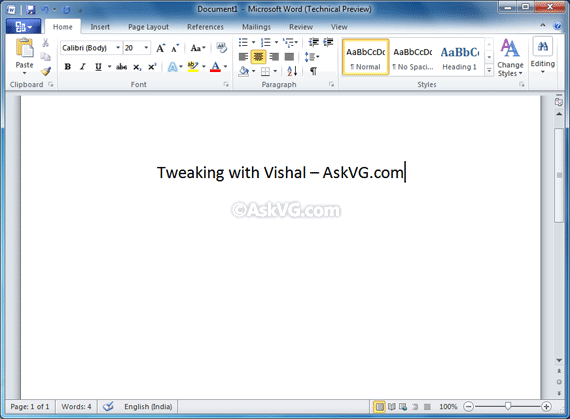
Following are screenshots of Microsoft Word, Excel, PowerPoint, Access and Outlook 2010 in action (Click on the images for bigger screenshots):

Microsoft Word 2010:

http://img.photobucket.com/albums/v374/vishaal_here/Microsoft_Word_2010_Tech_Preview_Sm.png

Microsoft Excel 2010:

http://img.photobucket.com/albums/v374/vishaal_here/Microsoft_Excel_2010_Tech_Preview_S.png

Microsoft PowerPoint 2010:

http://img.photobucket.com/albums/v374/vishaal_here/Microsoft_PowerPoint_2010_Tech_Prev.png

Microsoft Access 2010:

http://img.photobucket.com/albums/v374/vishaal_here/Microsoft_Access_2010_Tech_Preview_.png

Microsoft Outlook 2010:

http://img.photobucket.com/albums/v374/vishaal_here/Microsoft_Outlook_2010_Tech_Preview.png

Microsoft has removed the Office ORB from left top area. Instead they have changed it to a rectangle Office button which shows a totally revamped Task Pane upon clicking (Click on the image for bigger screenshot):

http://img.photobucket.com/albums/v374/vishaal_here/Microsoft_Office_2010_Tech_Previ-6.png

Here you can Save, Open, Close, Create documents.

One more interesting thing is "Send-a-Smile" application which has been included in this Technical Preview to send the feedback. It sits in the system tray and allows you to send your feedback about Office 2010:

http://img.photobucket.com/albums/v374/vishaal_here/Microsoft_Excel_2010_Tech_Previe-1.png

Click on the desired smiley and it'll allow you to type your comment:

http://img.photobucket.com/albums/v374/vishaal_here/Microsoft_Excel_2010_Tech_Previe-3.png

You can also send your current Desktop screenshot along with your E-mail ID while submitting the feedback.

After using it for a few minutes, we didn't find any issue. The performance is quite impressive. No doubt, Microsoft is working very hard to make its products perfect as we have seen in case of Windows 7 and now its turn of Office 2010. Good going MS...


This article was posted in Microsoft Office.

Subscribe to RSS Feed | Email Newsletter | More Articles

Related Articles

Popular Articles


26 Comments

  • Actually, a few notes, if I'm not mistaken:

    1. Office button brings up "Back Stage" view.
    2. Send-a-Smile is accompanied by Send-a-Frown.
    3. It is said on download.com that it's optimized for Windows 7 and the apps take 2-5 secs to load...

  • 2007 + Windows7 = 2-5secs. I don't like this new UI, it looks too washed out - like WMP12. I like that they've extended the glass (a bit) adding fade, it's just it looks as if they took a step forward with 2007 and now a step back.

    Yes I know it's only a technical preview, but they have had 3 years to work on the UI...

  • Still waiting for my approval. :(

  • I've installed it, but when I run, i get the "report to microsoft" error. Anyone else have this or have a solution?

  • tell me the minimum system requirement?
    a friend installed it and says it lags like snail.
    is there any patch available to make my existing office 2007 looklike 2010?

  • Yeah.. I Had Applied For It.. And I Got My Invitation Mail In My Hotmail ID...
    Right Now M Downloading It..
    It looks Good ..Lets See
    Thanx VG !

  • Same than office 2007. Why i have to be at least 18 yrs old to register Ms connection?

  • I registered for the Technical Preview, and received my invitation.
    Was wondering if it was possible for me to share the preview with a friend of mine who missed the registration?

  • VG

    ^^ No. You can't share the installer with anyone. It would be against the Terms & Conditions which you accepted while registering for the product.

    @Olli
    I think its because the laws are different for minors and adults and it would make their life easier if all testers are 18+ so that the same law can be applied for all.

    @MMG
    Following are the system requirements:

    CPU: 500 MHz processor or higher
    RAM: 256 MB or higher
    HDD: 2 GB
    OS: Windows XP SP3, Vista SP1, Server 2003 R2 SP2, Server 2008 SP1, Windows 7

    @Jason Yip
    No. If you have any other system or Windows installed, try to install there.

  • Yay! I got the invitation! :)

Add a Comment

NOTE: If you can't see your comment, please be patient. It'll appear as soon as we approve it.


Create an avatar that will appear with your comment.