
Add “Desktop Shortcuts” Cascading Menu in My Computer Context Menu in Windows 7 and Later
This article will help you in adding a new “Desktop Shortcuts” cascading menu to My Computer context menu (or right-click menu).
Recently we posted a tutorial for adding your favorite programs shortcuts under cascading menus in Windows 7 Desktop and My Computer context menus:
Add Cascading Menus for Programs in Desktop and My Computer Context Menus in Windows 7 and Later
Advertisement
It might become very useful if you want to add your frequently used programs or system tools under separate groups.
Today in this article, we are providing a ready-made registry script which can add a new cascading menu “Desktop Shortcuts” in Windows 7 My Computer context menu which contains following useful shortcuts under it:
- Change Theme
- Change Wallpaper
- Change Screen Saver
- Change Desktop Icons Settings
- Change Sound Scheme
- Change Mouse Pointers
- Change DPI Scaling
- Change Window Color and Appearance
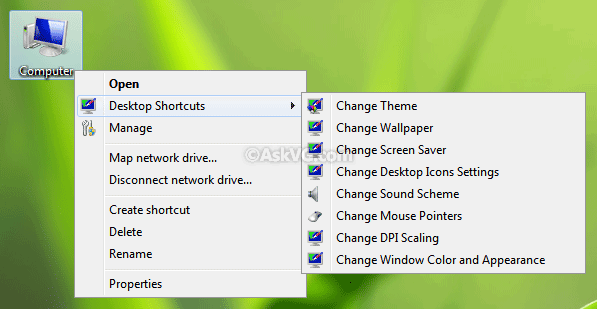
By default, it adds the cascading menu in the middle of context menu. But if you want, you can add it at top or bottom of context menu.
There are 3 different scripts included in the ZIP file, simply run the desired REG file to add the cascading menu.
There is also an uninstallation script available in the ZIP file so that you can remove the cascading menu.
Advertisement
PS: If the cascading menu doesn’t work for you, first take ownership of following keys in Registry Editor:
HKEY_CLASSES_ROOT\CLSID\{20D04FE0-3AEA-1069-A2D8-08002B30309D}\shell
HKEY_LOCAL_MACHINE\SOFTWARE\Microsoft\Windows\CurrentVersion\Explorer\CommandStore\Shell
Then run the registry script again.
Also Check:
Comments
NOTE: Older comments have been removed to reduce database overhead. Be the first one to start the discussion.